Codemagic pricing, free tier, and when it's worth paying
Hosted mobile CI/CD with 500 free macOS minutes a month, then $0.095 per M2 minute.
Best for
- Cross-platform mobile CI/CD
- Solo apps that stay inside 500 build minutes a month
- TestFlight and App Store uploads
Not good for
- iOS-only apps already covered by Xcode Cloud's included hours
- Rare releases a local fastlane run already handles
- Teams needing a second concurrent build or a second seat
Pros and cons
Pros
- The free 500 macOS M2 minutes per month let a solo developer run real iOS builds and TestFlight uploads at no cost.
- Pay as you go bills per minute, so an app with a slow release cadence does not pay for idle capacity.
- Linux and Windows minutes cost $0.045 against $0.095 on the M2 Mac, so non-Apple work in a cross-platform pipeline is roughly half price.
- Configuration lives in a codemagic.yaml file in your repository, so the pipeline is version-controlled alongside the app.
- It can call fastlane lanes, so existing local automation carries into CI without a rewrite.
Cons
- Past the free 500 minutes, macOS minutes are metered at $0.095 each on the M2, so a slow build on every push turns into real money.
- The free plan is capped at one concurrency and one team member, and it cannot buy more — extra concurrency requires moving to pay as you go at $49 each.
- An iOS-only developer already pays for the Apple Developer Program, which includes 25 Xcode Cloud compute hours a month — three times Codemagic's free minute allowance.
- Fixed annual plans start at $3,990, which only pays off above roughly 67 hours of M2 build time a month.
- iOS code signing on hosted machines takes deliberate setup before the first green build.
Short answer
Codemagic gives you 500 free Mac mini M2 minutes a month. After that, it's $0.095 a minute. Linux minutes stay at $0.045, and fixed annual plans start at $3,990 (checked Oct 15, 2026). For a solo iOS developer, the allowance covers a light release cadence. Xcode Cloud's 25 included compute hours cover more.
What you are actually renting
Codemagic is hosted mobile CI/CD. It runs your builds, tests, code signing, and store uploads on managed macOS and Linux machines, so you do not maintain a build server or keep a Mac awake for releases. For a solo developer the product is simple to describe: you are renting a Mac by the minute.
That framing matters more than the feature list, because every pricing decision below follows from it. A build minute is wall-clock time on a machine, not compute you can optimise away with a faster laptop. A ten-minute build that runs on every push to a busy branch is a recurring bill, and the fastest way to cut a Codemagic invoice is to make the build shorter or run it less often — not to move to a cheaper plan.

What does Codemagic cost?
Four ways to pay: a free monthly allowance, per-minute billing, a fixed annual fee, and enterprise.
Codemagic plans (checked Aug 5, 2026)
| Plan | Price | What is included |
|---|---|---|
| Free | $0, then standard per-minute rates | First 500 Mac mini M2 minutes each month at $0, then $0.095 each. Unlimited applications, 1 concurrency, 1 team member, 30-day artifact retention |
| Pay as you go | $0.045 per minute on Linux X2 and Windows, $0.095 on the Mac mini M2, $0.114 on the Mac mini M4 | Minutes billed per minute, unlimited team members, 1 concurrency included and up to 3 at $49 each |
| Fixed price | From $3,990 per year on the M2, $5,400 on the M4, $9,000 on the Mac Studio M4 Max | Unlimited minutes on that machine, 3 concurrent builds, extra concurrency from $1,500 per year |
| Enterprise | From $12,000 per year | Custom machines and regions, SSO, dedicated support |
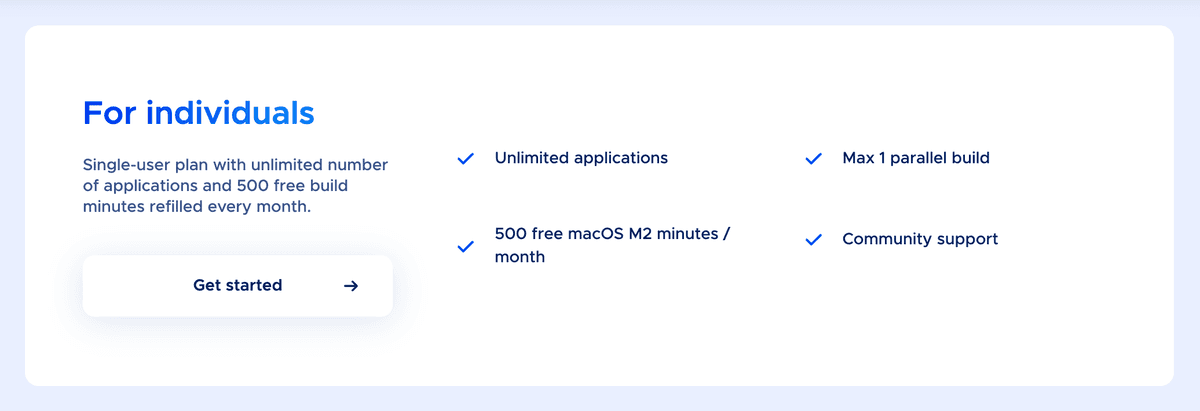
The free allowance is the number that matters for a solo app, so be precise about what it is. Codemagic's own plan comparison lists the free Mac mini M2 rate as "first 500 / month - $0, then $0.095 / minute" (checked Aug 5, 2026), and inside the app the allowance appears as a "Free macOS minutes personal use" counter that runs to 500. So the 500 minutes are the first 500 of the month rather than a separate product you graduate out of, and the rate past them is the standard one.
Going past the allowance is still a deliberate step, not a silent overage. The CI/CD card in the app carries an Enable subscription action, so continuing means turning billing on. At a fifteen-minute iOS build the allowance is about 33 builds a month — enough for a weekly TestFlight and a release before that decision arrives.
Prices last checked Aug 5, 2026, from codemagic.io/pricing. Confirm before you commit spend — per-minute rates and machine generations both move.
Codemagic, Xcode Cloud, or Bitrise: where does the cost cross over?
For a solo iOS developer this is the only comparison that decides anything, and it is a cost question, not a features question. Here are the list prices side by side.
iOS CI at list price (checked Aug 5, 2026)
| Path | List price | What that buys per month | Where it wins |
|---|---|---|---|
| Xcode Cloud, included | $0 on top of the $99 per year Apple Developer Program | 25 compute hours | iOS-only, light to moderate cadence |
| Codemagic free plan | $0 up to 500 M2 minutes, then $0.095 each | 500 free minutes, 1 concurrency, 1 seat | A solo developer at almost any realistic cadence |
| Codemagic pay as you go | $0.095 per M2 minute from the first minute | Exactly the minutes you use, no allowance | Teams needing unlimited seats or extra concurrency |
| Xcode Cloud, first paid tier | $49.99 per month | 100 compute hours | Steady iOS builds and parallel test matrices |
| Bitrise Starter | $89 per month billed annually, $99 monthly | Unlimited builds, up to 3 concurrent | Predictable spend at a heavier cadence |
| Codemagic Fixed M2 | $3,990 per year, or $332.50 per month | Unlimited M2 and Linux X2 minutes, 3 concurrent | High volume only |
| A solo developer stays on the free plan and pays overage; the pay-as-you-go plan exists for unlimited seats and extra concurrency, which a one-person app does not need. |
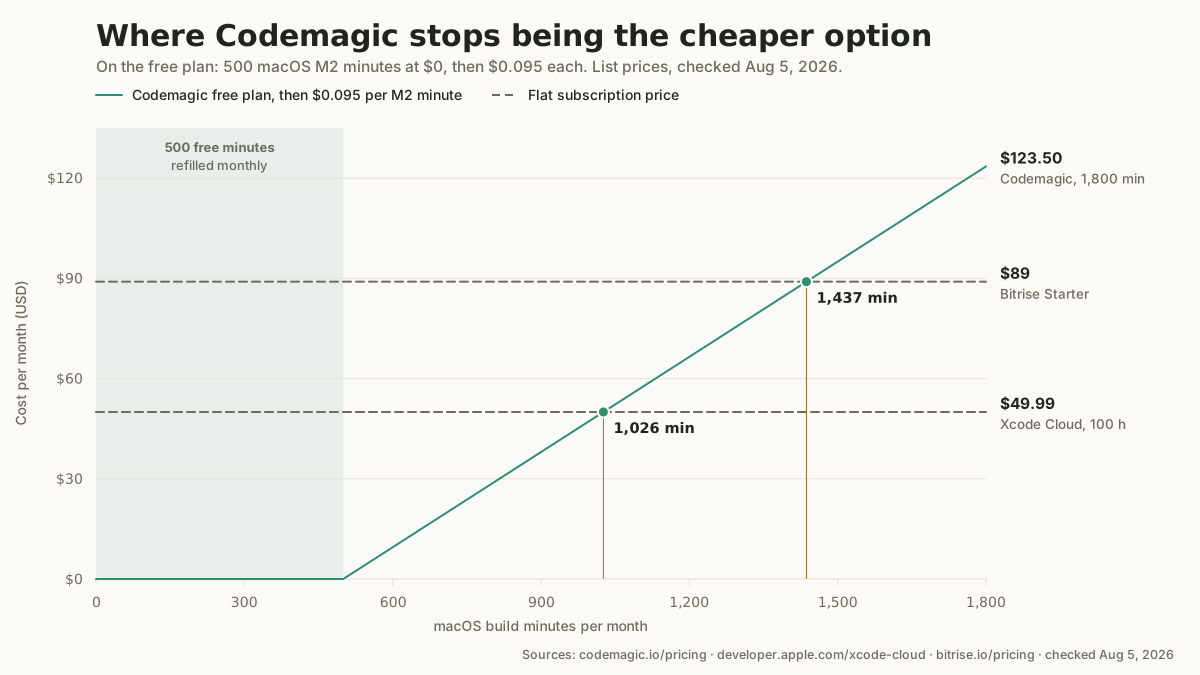
Add the 500 free minutes to the subscription divided by the per-minute rate, and the crossover points fall out. Codemagic costs less than:
- Xcode Cloud's $49.99 tier until about 1,026 minutes a month — 500 free, plus the 526 minutes that $49.99 buys at $0.095. That is roughly 17 hours of building.
- Bitrise Starter at $89 billed annually until about 1,437 minutes a month, roughly 24 hours.
- Codemagic's own Fixed M2 plan ($332.50 a month) until 4,000 minutes a month, about 67 hours. A solo app does not reach that without a broken pipeline.
Those thresholds are high. At a fifteen-minute build, 1,026 minutes is 68 builds a month — more than two a day, every day. Most solo apps never get there, which is the honest headline: for one developer, Codemagic's metered billing is usually the cheaper structure, and the reason to leave it is rarely price.
Two honest caveats, because the units are not the same thing.
Compute hours are not build minutes. Apple bills Xcode Cloud in compute hours and runs tests in parallel, so parallel work consumes the allowance faster than the wall clock suggests — Apple's own example is five twelve-minute tests adding up to one compute hour. A minute-for-minute reading overstates Apple's advantage as soon as you run a test matrix.
Bitrise prices its free tier in credits, not minutes. Hobby includes 300 build credits a month, and the credit-per-minute rate for each machine is not stated on the pricing page (checked Aug 5, 2026), so the free tiers are not directly comparable. Bitrise's paid Starter plan is the honest comparator, because "unlimited builds up to 3 concurrent" needs no conversion.
The one-line verdict
When should you not use Codemagic?
Four cases where the answer is no, and one of them is the common one.
- You ship iOS only and already pay the $99 Apple Developer Program fee. That membership includes 25 Xcode Cloud compute hours a month — three times Codemagic's 500 free minutes in raw units, on Apple's own machines, inside Xcode. Spending money on hosted CI before exhausting an allowance you have already bought is the most expensive mistake on this page.
- You release rarely and a local fastlane run already works. Hosted CI is overhead you do not need yet. The cheapest CI is the one you have not rented.
- Your build is slow and you push often. As a hypothetical: ten pushes a day of a twenty-minute build is 200 minutes a day, so the free 500 minutes are gone before the third day and every day after costs about $19 at $0.095 a minute. Cache dependencies and gate the pipeline on branches before you scale spend.
- You need parallel builds on a budget. The free plan is one concurrency and cannot buy more, and extra concurrency on pay as you go is $49 each. Bitrise Starter's three concurrent builds at $89 a month billed annually is the cleaner buy at that point.
If Codemagic is not the fit, the rest of the dev-productivity category covers the CI and release-automation tools reviewed here.
Setup and integration
Codemagic supports native iOS and Android, Flutter, React Native, Ionic, Unity, and MAUI (checked Aug 5, 2026). You connect a Git repository and define builds in a codemagic.yaml file or the workflow editor; the iOS path covers signing with an App Store Connect API key, building the archive, and uploading to TestFlight or the App Store. Expect a moderate first setup rather than a five-minute one.
Two gotchas are worth planning for. iOS code signing is the usual stumbling block, so set up the App Store Connect API key and certificates early. Build minutes on macOS machines are metered, so cache dependencies and avoid rebuilding on every trivial commit — on pay as you go that is the difference between a rounding error and a subscription.
Codemagic appears as a release-automation alternative in the indie iOS stack archetypes, where fastlane is the default and hosted CI is the upgrade path.
Frequently asked questions
How much does Codemagic cost per build?
Nothing, until you pass the free allowance. The first 500 Mac mini M2 minutes each month cost $0; after that you are billed per minute, not per build, so the cost is your build length times the machine rate: $0.095 per minute on the Mac mini M2, $0.114 on the M4, and $0.045 on Linux X2 or Windows (checked Aug 5, 2026). A fifteen-minute iOS build past the allowance is about $1.43.
Is the free tier enough for one app?
For a light cadence, yes — and passing it is not a cliff. The free plan includes 500 macOS M2 build minutes a month, one concurrency, and one team member (checked Aug 5, 2026), which is roughly 33 builds at fifteen minutes each. Past 500 the rate is the standard $0.095 a minute, so the cost rises gradually rather than jumping to a new tier — though you do have to enable a subscription in the app to keep building. What forces a real plan change is needing a second concurrent build or a second seat, neither of which the free plan allows.
Is Codemagic cheaper than Xcode Cloud?
For iOS-only work Apple is usually cheaper, because its included allowance is larger. The Apple Developer Program at $99 a year includes 25 Xcode Cloud compute hours a month, which is three times Codemagic's 500 free minutes in raw units. Codemagic only passes Xcode Cloud's $49.99 tier at about 1,026 minutes a month. So Apple wins on the free allowance, Codemagic wins on cross-platform builds Xcode Cloud does not run at all, and past roughly 1,026 minutes of monthly iOS building the subscription is the cheaper shape.
How is Codemagic different from Bitrise?
Both are hosted mobile CI/CD with macOS machines and store deployment. Bitrise uses a step-based visual workflow and prices in build credits and monthly plans, while Codemagic centers on a YAML config with a free monthly minute allowance and per-minute billing. Codemagic is usually the lighter start for a solo developer; Bitrise Starter's unlimited builds at $89 a month billed annually is the better shape once the cadence is heavy.
Do I still need fastlane with Codemagic?
Not necessarily, but they pair well. Codemagic can sign, build, and upload on its own, yet many pipelines call fastlane lanes for finer control over metadata, screenshots, or signing. Running the same lanes locally and in CI keeps behavior consistent.
Alternatives
Related comparisons
No related comparisons are published yet.
Related guides
No related guides are published yet.