fastlane
Yes, fastlane is free. You pay for the Mac or the CI minutes where the lanes run.
Best for
- Release automation
- Screenshots
- App Store deployment
Not good for
- Teams that want a fully hosted CI dashboard by default
Pros and cons
Pros
- The MIT license is free of charge, so there is no seat fee and no usage fee for fastlane itself.
- The same lanes run on your Mac and inside CI, so you are not tied to one host.
- match stores signing identities in a git repository you control.
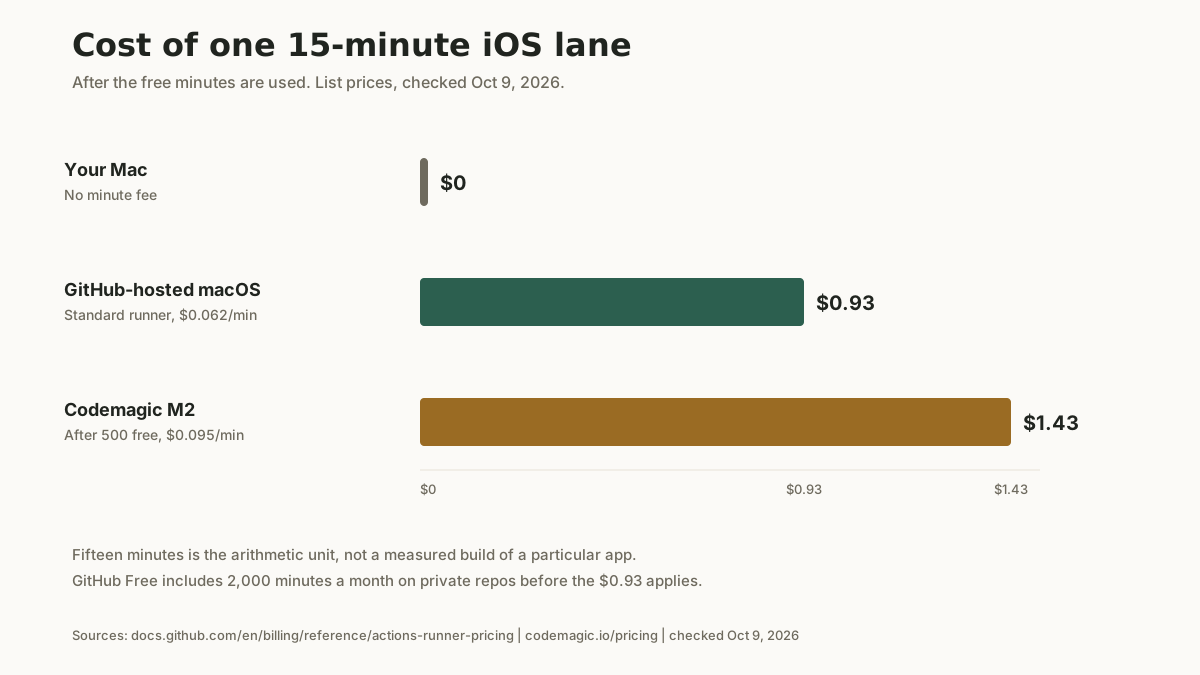
- Published runner rates make a 15-minute lane calculable: $0.93 on standard GitHub-hosted macOS, and about $1.43 on Codemagic M2, once free minutes are gone.
Cons
- fastlane does not include a Mac. You still supply one, or you pay a runner.
- Setup depends on Ruby and Xcode, so a version change can break a lane that worked last month.
- match is a git repository of certificates, which needs deliberate access control.
- Support is the community around an open-source project, not a paid help desk.
Short answer
Yes. fastlane is free under the MIT license, with no subscription for the tool (checked Oct 9, 2026). The cost is the machine the lane runs on. Your own Mac has no minute fee. A standard GitHub-hosted macOS runner is $0.062 a minute past included minutes, and Codemagic's Mac mini M2 is $0.095 a minute after 500 free minutes.
What the free license covers
fastlane automates the repetitive release work: screenshots, certificates, metadata, TestFlight, and store upload. You define that once in a Fastfile and run it as a lane. The license grants that use free of charge, and the docs describe the project as open source under the MIT license, running on your machine or a CI server (checked Oct 9, 2026).
There is no seat fee and no usage fee for the tool. The maintenance that does not appear on an invoice is keeping the Fastfile, the signing setup, and the Ruby and Xcode versions in agreement. This page does not invent an hourly rate for that time.
What a lane costs on the common runners
The license is $0. The minute is not, once you leave your own Mac.
Take a fifteen-minute iOS lane as the arithmetic unit. It is not a measured build of a particular app. GitHub rounds each job up to the next whole minute, so a lane that runs 14 minutes and a few seconds is billed as 15.
Where a fastlane lane is billed (checked Oct 9, 2026)
| Runner | Published rate | What that means for one lane |
|---|---|---|
| Your Mac | $0 per minute | You supply the machine. GitHub does not bill self-hosted runners. |
| GitHub-hosted macOS, standard | $0.062 per minute | 3-core M1 or 4-core Intel. A 15-minute lane is $0.93 once included minutes are gone. |
| Codemagic Mac mini M2 | $0 for the first 500 minutes each month, then $0.095 | A 15-minute lane past that allowance is $1.425, about $1.43. |
| Xcode Cloud | 25 compute hours a month included, then $49.99 a month for 100 hours | Apple's CI, not a fastlane runner. A compute hour is not a wall-clock minute. |
| Bitrise macOS Medium | $0.0072 per minute on the machine table | Hobby is a separate 300-credit allowance. Starter is a flat plan. See below. |
GitHub Actions. Standard hosted runners on private repositories draw the plan's included minutes first. The Free plan includes 2,000 minutes a month. GitHub's billing page measures a job in the minutes it runs, then prices those minutes by runner. It does not publish a separate macOS multiplier on that page. Past the included minutes, standard macOS is $0.062 a minute. Public repositories using standard hosted runners are not billed. Larger macOS runners are a different rate and cannot use included minutes: $0.077 for the 12-core machine and $0.102 for the 5-core M2 Pro. Checked Oct 9, 2026, on Actions runner pricing and GitHub Actions billing.
Codemagic. The plan comparison lists Mac mini M2 as "first 500 / month - $0, then $0.095 / minute". Mac mini M4 is $0.114. Linux and Windows are $0.045. The minute-by-minute crossover against Xcode Cloud and Bitrise Starter is on the Codemagic page. Rates rechecked Oct 9, 2026 from codemagic.io/pricing.
Xcode Cloud. Membership includes 25 compute hours a month. The next tier is 100 compute hours at $49.99 a month (checked Oct 9, 2026, developer.apple.com/xcode-cloud). Those hours are Apple's build service. They are not minutes you spend running a fastlane lane, so this page does not convert them into a per-lane price.
Bitrise. The pricing FAQ lists macOS Medium at $0.0072 a minute and marks that machine available on Hobby and Starter. Hobby is free, with 300 build credits a month and 1 private app, and the page does not say how many credits one minute consumes. Starter starts at $89 a month billed annually, or $99 billed monthly, and Bitrise describes it as unlimited build minutes with up to 3 concurrent builds. Do not multiply $0.0072 by your minutes and call that the Starter invoice. Checked Oct 9, 2026, on bitrise.io/pricing. Bitrise is the tool page for the rest of that fit.
When a managed CI service is worth paying for
Pay for a hosted runner when the lane has to run while you are not at the Mac. A local fastlane run stays the lower bill only while you are willing to be the machine.
Stay on your Mac when releases are rare and a lane you already trust finishes at your desk. Renting a hosted Mac for a monthly release adds a pipeline to watch, and the minute fee is the smaller part of that.
Move the same lanes onto Codemagic or GitHub Actions when you want the build to start from a push. On Codemagic the first 500 M2 minutes each month are $0. On GitHub Free, 2,000 included minutes cover a lot of fifteen-minute lanes before the $0.93 charge appears. As a hypothetical, four fifteen-minute lanes a week is 60 minutes, or $3.72 at $0.062, once included minutes are gone. The same cadence across four weeks is 16 lanes and $14.88. Either figure is the bill for leaving the Mac, and neither is, by itself, a reason to buy a flat plan.
Choose the flat plan when the cadence is heavy or you need more than one build at a time. Bitrise Starter, from $89 a month billed annually, is the shape Bitrise publishes for unlimited minutes and up to 3 concurrent builds. If the app is iOS-only, use the 25 Xcode Cloud compute hours included with membership before you rent another Mac to host the same lane. The Codemagic page does that subscription arithmetic.
If none of these is the fit, the dev-productivity category is the rest of the CI and release tools reviewed here.
Setup and integration
fastlane installs through RubyGems or Homebrew and runs on macOS for iOS work. You initialize it in the project and define lanes in a Fastfile. Common building blocks include match for shared, git-stored code signing, snapshot for localized screenshots, deliver for metadata and store upload, and pilot for TestFlight. The first setup is the slow part: match, Ruby, and Xcode have to agree before a lane is boring. Later releases are the command you already wrote.
Two things break lanes later. match stores certificates in a git repository, which is useful and needs access control from the start. fastlane also depends on Ruby and the Xcode command-line tools, so pin those versions if more than one machine runs the lane.
Frequently asked questions
Is fastlane free?
Yes. The MIT license grants use free of charge, and the docs describe the project as open source under that license (checked Oct 9, 2026). There is no seat fee and no usage fee for the tool. The cost is the Mac or the CI minutes where the lane runs.
What does a fastlane lane cost on GitHub Actions?
On a standard GitHub-hosted macOS runner, $0.062 per minute after the account's included minutes (checked Oct 9, 2026). A fifteen-minute lane is $0.93. The Free plan includes 2,000 minutes a month for private repositories. The same lane on your own Mac, including a self-hosted runner, has no GitHub minute charge.
Is fastlane cheaper than Codemagic?
They are not the same layer. fastlane is the script. Codemagic is a place to run it, at $0 for the first 500 Mac mini M2 minutes each month and $0.095 a minute after that (checked Oct 9, 2026). The same lanes on your Mac have no CI minute fee. The Codemagic page works out when that hosted minute costs more than Xcode Cloud or Bitrise Starter.
When is managed CI worth paying for?
When the lane has to run without you at the Mac. If you ship iOS only, use the Xcode Cloud hours included with the Apple Developer Program before you rent another Mac. If you release rarely and a local fastlane run already works, hosted CI is extra setup.
Do I still need App Store Connect if I use fastlane?
Yes. fastlane uploads builds, metadata, and screenshots to App Store Connect. You still create the app record, the products, and the agreements there.
Alternatives
Related comparisons
No related comparisons are published yet.