Keywords Everywhere review, credit pricing, and no mobile app
Web search volume from $84 a year, with a free API key. Not App Store keywords, and not a phone app.
Best for
- Launch-page and blog research on Google
- Checking web demand before you write or buy ads
- One person on the Bronze credit plan
Not good for
- App Store or Google Play search volume
- Android, iPhone, iPad, or Safari
- Rank tracking
Pros and cons
Pros
- Shows Google volume, CPC, and competition on the searches you already run, so a launch page does not need a separate SEO suite.
- The API key is free. Paid credits attach to that key, and the same key covers your own browsers on one seat (checked October 20, 2026).
- Bronze is $84 a year for 100,000 credits and one seat. Silver is $168, Gold is $480, and Platinum is $1,440, all annual (checked October 20, 2026).
- It is a browser overlay, not an SDK, so nothing is added to the app binary.
Cons
- The numbers are Google web search volume. The vendor says a Google Play overlay is Keyword Planner data, not Play Store demand. It does not replace an App Store ASO tool.
- Plans are annual only. The vendor prints $7 a month beside Bronze, which is $84 divided by 12, not a monthly bill. Credits expire 12 months after purchase.
- There is no Android app, no iPhone or iPad app, and no Safari version. You need Chrome, Firefox, or Edge on a desktop or laptop.
- A Google search that shows 8 Related, 20 People Also Search For, and 25 Long-tail keywords uses 54 credits, so casual browsing burns the meter faster than a one-keyword lookup.
Keywords Everywhere is a Chrome, Firefox, and Edge extension from Axeman Technology Solutions LLP. Verdict for a solo mobile developer: it earns a place when a launch page or a blog post needs Google demand while you browse. It does not earn a place for an App Store listing, for rank tracking, or for research on a phone.
The numbers are web search volume, not app-store search volume. The vendor says the figures come from Google Keyword Planner. On Google Play, the vendor says the overlay is that same Google volume, not Play Store demand, because Play does not publish search counts. There is no Android app and no iPhone app. The vendor FAQ says it will not run on Safari, iOS, or Android, including phones and tablets.
The API key is free. Keyword ideas, traffic and Moz metrics, SEO reports, social insights, and prompt templates work with no key and use no credits. Volume, CPC, competition, and trends need that free key plus a paid annual plan. The vendor says the plan and the credits are tied to the key, and the same key works across your own browsers.
Pricing, checked Oct 20, 2026 on the compare-plans page: Bronze is $84 a year for 100,000 credits and 1 seat. Silver is $168 a year for 400,000 credits and 3 seats. Gold is $480 a year for 2,000,000 credits and 10 seats. Platinum is $1,440 a year for 8,000,000 credits and 20 seats. There is no monthly plan. Credits expire 12 months after purchase. The how-to for a launch page is Keywords Everywhere for indie app developers.
Pricing
Keywords Everywhere is freemium. The extension installs at no cost. Search volume, CPC, competition, and trend data run on credits sold as annual plans. These figures were checked on Oct 20, 2026 against the official compare-plans page.
Keywords Everywhere plans (checked Oct 20, 2026)
| Plan | Price | Credits / year | Seats | Per-site research cap | Notes |
|---|---|---|---|---|---|
| Free | $0 | None | n/a | n/a | Keyword ideas, traffic and Moz metrics, SEO reports, social insights, prompt templates. No search volume. |
| Bronze | $84 / year | 100,000 | 1 | Top 1,000 keywords and 1,000 backlinks | Full extension and API. One seat. |
| Silver | $168 / year | 400,000 | 3 | Top 2,000 keywords and 2,000 backlinks | Adds SEO Minion and premium ChatGPT prompts. |
| Gold | $480 / year | 2,000,000 | 10 | Top 5,000 keywords and 5,000 backlinks | Adds Keyword Keg and RapidLevelUp courses. |
| Platinum | $1,440 / year | 8,000,000 | 20 | Top 10,000 keywords and 10,000 backlinks | Priority email support. |
The compare-plans page prints Bronze as "$84/year" and "$7/mo" side by side. That "$7/mo" line is $84 divided by 12. The FAQ on the same site says there are no monthly plans. Silver, Gold, and Platinum show the same style of annual-divided-by-12 line ($14, $40, and $120). Do not budget a monthly invoice.
Credits are valid for 12 months from purchase, and the oldest credits are used first. One credit buys volume, CPC, competition, and the 12-month trend for one keyword, including a keyword with zero volume. A Google search that shows 8 Related keywords, 20 People Also Search For keywords, and 25 Long-tail keywords uses 1 + 8 + 20 + 25 = 54 credits. The vendor says YouTube or Amazon lookups that show a single number under the search bar use one credit, and that autocomplete metrics can be turned off if that burn rate is too high.
The per-site caps are the vendor's wording ("top 1,000" and so on). They apply when you pull the keywords or backlinks for a domain, not when you look up a single keyword. The vendor also says trend charts can show historical Google and YouTube volume back to 2004, and that the RapidLevelUp courses bundled on Gold and Platinum are "currently worth $1,194". Those are vendor claims, checked Oct 20, 2026.
For one person, Bronze is the plan that matches the job: one seat, 100,000 credits, and the same core extension and API as the higher tiers. Silver and above add seats and extras.
The API key
The API key is how Keywords Everywhere recognizes the account. Signing up is free. You pay only when you buy credits. Paste the key into the extension settings. The vendor says one seat covers all of your own devices and browsers, so a Bronze seat is enough for the laptop you already use. Get the key from the free API key page. If you lose it, the vendor has a reset page.
Free features do not need the key. Paid volume does. The vendor's compare-plans page also says a REST API and an MCP server share the same credit pool, and the FAQ links a public API doc for putting that data in your own app. That is a separate integration from the key you paste into the extension. This page did not call the API.
App keywords
It does not report App Store search volume. App Store search is a different index, with a different keyword field, and it needs an ASO tool such as AppTweak or Appfigures. The ASO tools guide is the longer list.
On Google Play, the vendor is explicit. The Google Play search volume page says no tool has genuine Play search counts, including Keywords Everywhere, because Play has never released them. The extension shows Google Keyword Planner volume under the Play search bar and in Play autosuggest. Treat that as web demand sitting on a store page, not as Play-native demand. Checked Oct 20, 2026.
Mobile and Android
No. The vendor FAQ says Keywords Everywhere is a desktop browser extension for Chrome, Firefox, and Edge. It does not work on Safari, and there is no iOS or Android app, so it will not run on a phone or tablet. You need a desktop or laptop. The homepage adds that there is no mobile app yet. Checked Oct 20, 2026.
Setup and integration
Install the extension from Chrome, Firefox, or Edge, then pin the K icon. Use the free widgets on a real landing-page draft before you buy credits. When a volume number would change the headline, add the free API key and an annual plan.
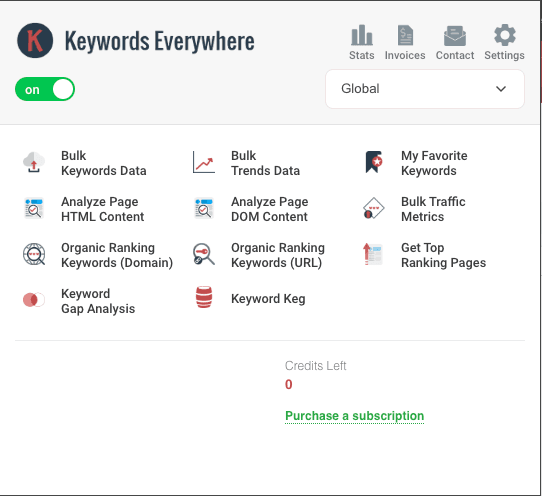
There is no SDK to add to the app binary. The adjustment is research habit: use it on the Google searches and competitor pages that already sit in a launch-page workflow. Turn off autocomplete metrics if a normal session burns credits too fast. Keep App Store keyword work in a separate ASO tool. The launch-page walkthrough is the indie guide.
Frequently asked questions
Is Keywords Everywhere an app keyword tool?
No. It overlays Google web search volume, CPC, and competition. It does not replace App Store listing research. On Google Play, the vendor says the number is Google Keyword Planner volume, not Play Store demand.
What does Keywords Everywhere cost?
Annual credits only, checked Oct 20, 2026. Bronze is $84 a year for 100,000 credits and 1 seat. Silver is $168 for 400,000 credits and 3 seats. Gold is $480 for 2,000,000 credits and 10 seats. Platinum is $1,440 for 8,000,000 credits and 20 seats. The vendor's "$7/mo" line is the Bronze annual price divided by 12, not a monthly plan. Credits expire after 12 months.
Where do I get the Keywords Everywhere API key?
From the vendor's free sign-up. The key is free. Volume data still needs a paid credit plan attached to that key. Paste it into the extension settings. The same key covers your own browsers on one seat.
Does Keywords Everywhere work on Android or iPhone?
No. There is no Android app and no iPhone or iPad app. It also does not run in Safari. Use Chrome, Firefox, or Edge on a desktop or laptop.
Is Keywords Everywhere free for indie developers?
The extension is free to install, and the vendor's FAQ lists keyword ideas, traffic and Moz metrics, SEO reports, social insights, and prompt templates as free, with no credits and no API key. Search volume, CPC, competition, and trends require a paid annual plan. The lowest paid plan is Bronze at $84 per year (checked Oct 20, 2026).
Do I still need AppTweak if I install Keywords Everywhere?
Yes, if ASO is the job. AppTweak is for App Store keyword research. Keywords Everywhere is for Google and other web properties. They do not replace each other.
Source checks
Pricing, platform, credit, API key, and product claims were checked on Oct 20, 2026 against official sources:
- Plan comparison, credit rules, per-site caps, and the annual-only billing note: https://keywordseverywhere.com/compare-plans.html
- FAQ (credits, API key, platforms, no iOS or Android app, Keyword Planner, rank tracking): https://keywordseverywhere.com/frequently-asked-questions.html
- Google Play overlay is Google Keyword Planner volume, not Play demand: https://keywordseverywhere.com/google-play-search-volume.html
- Free API key sign-up: https://keywordseverywhere.com/first-install-addon.html
- Public API documentation: https://keywordseverywhere.com/api-documentation.html
The extension popup capture is from Sep 21, 2026. Account details are redacted and credits were at zero. The capture documents the unpaid popup. It is not a ranking, accuracy, or full-product test. Affiliate links, where the page template shows them, use the site's /go redirect and a disclosure.
Last checked: 2026-10-20.
Alternatives
Related comparisons
No related comparisons are published yet.