guide
Keywords Everywhere for indie app developers: Google search data, not App Store ASO
How to use the browser extension on a launch page or blog post, and when a solo mobile developer should leave it out of the stack.
- Published
- September 21, 2026
- Last checked
- October 22, 2026
- Author
- IndieAppStack
Short answer
Use Keywords Everywhere when a Google volume number would change a launch-page headline or a blog topic. Install the extension on Chrome, Firefox, or Edge on a laptop, run the search you are already writing around, and read the overlay. Skip it when the next job is the App Store listing.
This page is the how-to. Pricing, the API key, and the mobile and Android answer are on the Keywords Everywhere tool page.
Affiliate disclosure
What you are installing
Keywords Everywhere is a browser add-on from Axeman Technology Solutions LLP. Once it is installed, keyword metrics appear on the pages you already use rather than in a separate dashboard. The tool page keeps the verdict, the credit table, the API key steps, and the phone answer.
The free install covers keyword-idea widgets, traffic and Moz link metrics, SEO difficulty, YouTube and local SEO metrics, social engagement insights, and prompt templates. The vendor says none of those free features use credits, and that several of them need no API key. Search volume, CPC, competition, trend charts, bulk uploads, and competitor gap analysis sit on paid annual credit plans. Current prices are on the tool page, rechecked Oct 20, 2026.
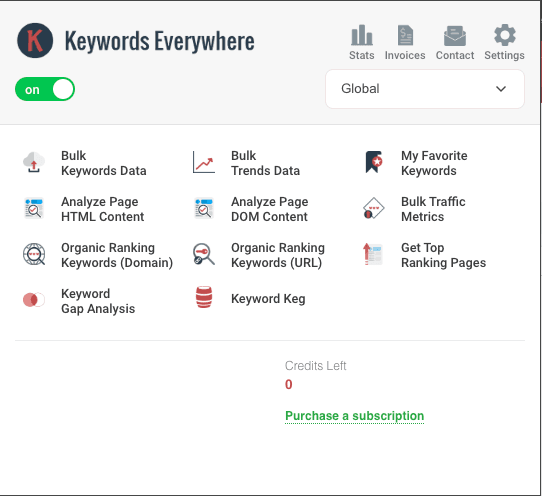
The popup is a research launcher inside the browser. A Sep 21, 2026 capture with credits at zero still shows the action grid and a purchase link. Volume, CPC, and competition stay locked until a paid plan is active.
Where Google keyword data shows up in an indie launch
If you ship a mobile app on your own, Google keyword data shows up in a few predictable places:
- Launch pages: choosing the headline and supporting copy for a Framer or Webflow page. The landing page builders guide covers that choice.
- Content: deciding whether a how-to post is worth writing before you spend a weekend on it.
- Ads: checking CPC before you buy search traffic to the landing page.
- Competitor pages: seeing which queries a rival site appears to rank for.
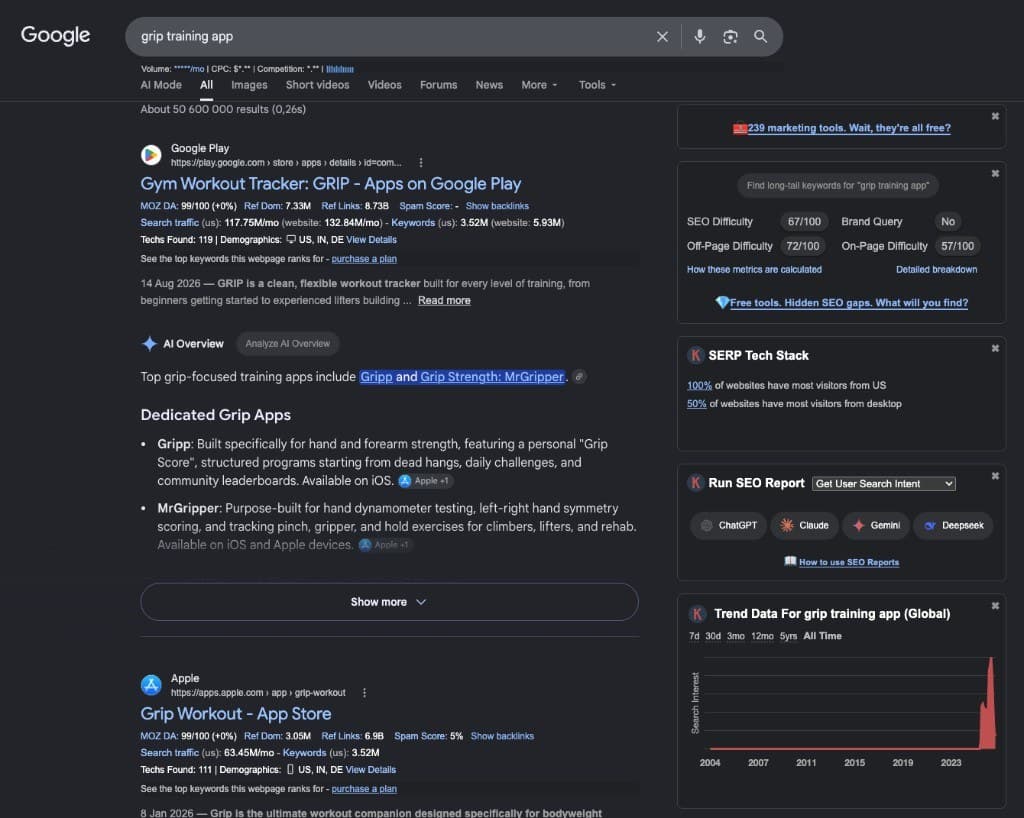
That capture is a Google results page, not an App Store search. Play and App Store listings can appear in Google. Volume and CPC under the search bar are hidden because credits were at zero. Moz, traffic, and ranking-keyword figures on those listing cards are Keywords Everywhere overlay estimates, not IndieAppStack measurements.
That is web demand, not App Store Optimization. App Store search uses a different index, a different keyword field, and different tools. For store-listing research, start with AppTweak or Appfigures and the ASO starter checklist. The tool page records what the vendor says about a Google Play overlay: Google Keyword Planner volume, not Play-native demand.
When does it earn a place in the stack?
When Keywords Everywhere helps a solo mobile developer
| Situation | Why it helps |
|---|---|
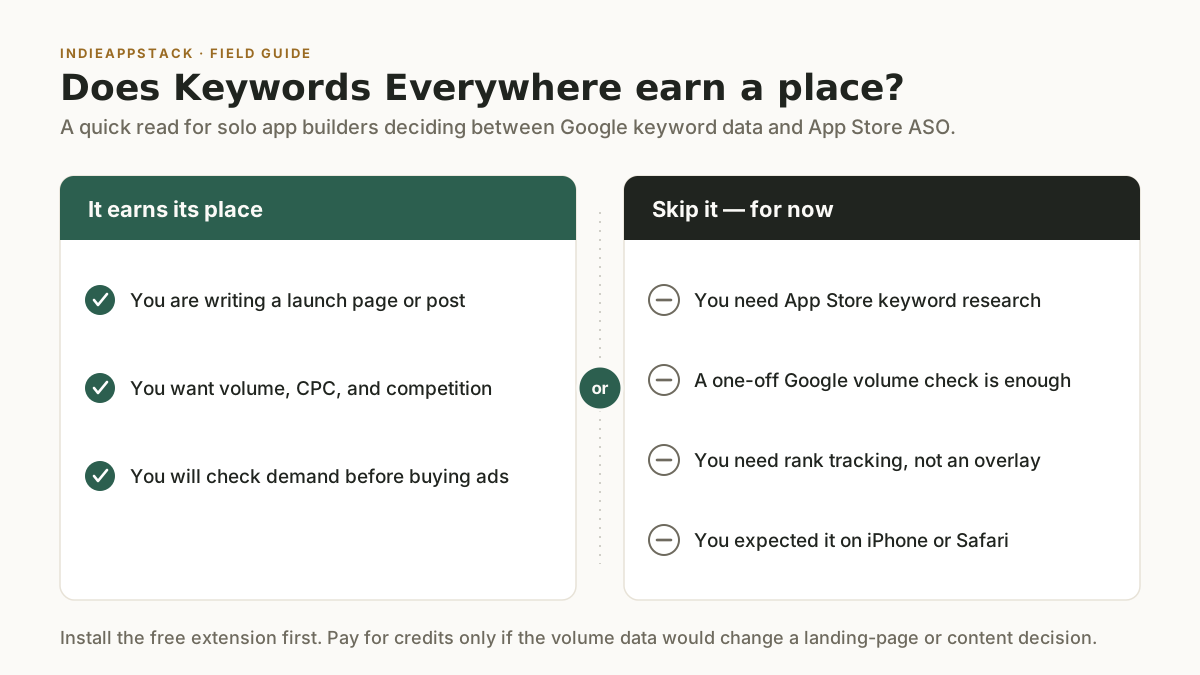
| You are writing a launch page or blog post | Volume and related queries show up on Google as you draft, so you do not context-switch into a separate SEO suite |
| You want CPC and competition, not only volume | A paid plan adds those metrics plus 12-month trends, which a volume-only overlay does not |
| You will check demand before buying ads or a content calendar | Inline data is enough to kill a weak topic early, without an Ahrefs- or Semrush-sized stack |
Use it for a launch page or a blog post when you want Google volume, CPC, and competition without a full SEO suite.
When should a solo developer skip it?
- You need App Store listing keywords. Keywords Everywhere does not replace AppTweak or other tools in the ASO category. Those products research Apple and Google Play store search.
- A one-off Google volume check is enough. Paid access is an annual credit bundle. If you will look up a handful of queries and stop, read the credit table before you buy a year.
- You need rank tracking. The vendor says it does not monitor your position day after day. It finds and researches keywords.
- You expected it on a phone. Do the work on a laptop browser. The mobile and Android answer, including Safari, is on the tool page.
Leave it out for App Store listing research, rank tracking, or anyone who needed it on an iPhone.
How to use it on a launch page
- Install the extension on Chrome, Firefox, or Edge on a desktop or laptop, and pin the K icon.
- Open the draft headline as a Google search. Read the free widgets first: related queries, traffic metrics, and the prompt templates. You can do that pass before you care about a key.
- If a volume, CPC, or competition number would change the headline, the post, or an ad, add the API key and a plan. The tool page has the key steps and the current credit prices.
- Turn off search-suggestion metrics if a normal Google session burns credits too fast. The tool page has the vendor's credit example.
- Keep App Store listing work in AppTweak or Appfigures. Do not mix the two indexes.
Start with Keywords Everywhere. That link is an affiliate redirect.
Frequently asked questions
Where is the pricing?
On the Keywords Everywhere tool page. That page has the annual credit table, rechecked Oct 20, 2026. This guide does not repeat it.
How do I use it without treating it as an ASO tool?
Run it on the Google searches behind the launch page or the post. When the job moves to the App Store listing, switch to the ASO starter checklist and the ASO tools guide.
How is it different from Google Keyword Planner?
The vendor says it uses the same search volume data as Google Keyword Planner, then shows monthly volume inline as you browse, without requiring active Google Ads spend. Keyword Planner lives inside a Google Ads account and, without active campaigns, groups volumes into broad ranges.
Does volume on YouTube or Amazon come from those sites?
No. The vendor states that only Google releases search volume, so YouTube, Amazon, and similar sites show Google volume rather than a native estimate.
Do I still need AppTweak if I use Keywords Everywhere on a launch page?
Usually yes, if ASO is also the job. AppTweak is for App Store keyword research, metadata, and competitor listings. Keywords Everywhere is for the web properties around the launch. They do not replace each other.
The recommendation
For a solo mobile developer, use Keywords Everywhere while you are writing launch-page copy or a blog topic and you want Google volume in the browser. Install the free extension first. Pay only once a volume number would change a real marketing decision, and check the price on the tool page before you do. If the next job is the App Store listing, stay in the ASO tools.
Source checks
Product claims on this page were checked on Oct 20, 2026 against official sources. Credit prices are maintained on the tool page, from the same check:
- Keywords Everywhere homepage: https://keywordseverywhere.com
- Plan comparison and credit rules: https://keywordseverywhere.com/compare-plans.html
- FAQ (credits, platforms, Keyword Planner, rank tracking): https://keywordseverywhere.com/frequently-asked-questions.html
- Google Play overlay wording, cited from the tool page: https://keywordseverywhere.com/google-play-search-volume.html
Product UI captures dated Sep 21, 2026 document the unpaid extension popup (account details redacted; credits at zero) and a Google overlay on an app-related query. Volume and CPC are hidden in that SERP capture. Overlay metrics on listing cards are Keywords Everywhere estimates, not IndieAppStack measurements. The captures are not a ranking, accuracy, or full-product test. The decision graphic is an owned diagram. Affiliate links are disclosed and use the site's /go redirect.
Last checked: 2026-10-20.