Appfigures
Store reports for the apps you connect, with keyword caps printed on the plan cards.
Best for
- Own-app download and revenue reporting
- Review monitoring across stores
- Keyword ranks on Monitor and above
Not good for
- Apps that only need App Store Connect
- Keyword research as the main job
- Competitor estimates on a solo budget
Pros and cons
Pros
- Starter is free, and the feature grid includes 5 connected apps (checked Oct 20, 2026).
- Connect is $9.99 per month, and its plan card prints 0 keywords and 0 competitors (checked Oct 20, 2026).
- The first printed keyword cap is Monitor at $44.99 per month for 100 keywords. Optimize is $149.99 per month for 500 keywords (checked Oct 20, 2026).
- Paid plans include 5 connected apps, then $1.99 for each app after that, so the sixth app has a published add-on price (checked Oct 20, 2026).
Cons
- Connect's plan card prints 0 keywords and 0 competitors, so the $9.99 plan is not an ASO tool (checked Oct 20, 2026).
- Competitor slots stay at 0 through Optimize. Boost is $399.99 per month for 5 competitors, $599.99 for 10, and $899.99 for 25 (checked Oct 20, 2026).
- The pricing page labels annual billing as saving about 20 percent. The printed annual rates are not a flat 20 percent off. Budget the annual column, not the label (checked Oct 20, 2026).
- Market Intelligence is a separate tab. Scout is $599.99 per month and the button says Get in Touch (checked Oct 20, 2026). That tab is the wrong place for a solo app's own sales report.
Short answer
Checked Oct 20, 2026. Appfigures is a web dashboard for store reports on apps you connect. Starter is free, and its feature grid includes 5 connected apps. Connect is $9.99 per month, and that plan card prints 0 keywords and 0 competitors. The first plan card with a keyword cap is Monitor, at $44.99 per month for 100 keywords. It suits a solo developer who wants those reports in one place. It does not suit an app that only needs App Store Connect, and Boost is the wrong purchase when the job is your own sales report.
Pricing
The figures below are printed on the Appfigures pricing page, Analytics and ASO tab, checked Oct 20, 2026. Annual amounts are the per-month rates shown when annual billing is selected. Starter does not have its own price card. Its $0 row is the free column in the feature grid, which prints 5 connected apps and 0 competitors, and does not print a keyword allowance.
The page labels annual billing as saving about 20 percent. That label is approximate. The annual column is the number to budget, and it is not a flat 20 percent off every row.
Appfigures plans (checked Oct 20, 2026)
| Plan | Monthly | Annual, shown per month | Keywords | Competitors |
|---|---|---|---|---|
| Starter | $0 | $0 | Not printed | 0 in the feature grid |
| Connect | $9.99 | $7.99 | 0 | 0 |
| Monitor | $44.99 | $35.99 | 100 | 0 |
| Optimize | $149.99 | $119.99 | 500 | 0 |
| Boost | $399.99, $599.99, or $899.99 | $349.99, $449.99, or $649.99 | 1,000 | 5, 10, or 25. The price follows the count you select |
| Amplify | $1,399.99 | $999.99 | 2,500 | Unlimited |
Paid plans include 5 connected apps, then $1.99 for each app after those 5. The add-on starts at the sixth app. The update-frequency cell is a dash on Connect, daily on Monitor, and hourly on Optimize, Boost, and Amplify.
A free trial needs no credit card and unlocks Optimize. The pricing FAQ does not say how many days it lasts. When it ends, the account moves to the free plan.
How it compares
Checked Oct 20, 2026. Appfigures and AppTweak do not start from the same job. Appfigures starts from reports on apps you connect. Connect's card prints 0 keywords, and competitor slots stay at 0 until Boost. AppTweak starts from keyword research and the listing. The head-to-head write-up is Appfigures vs AppTweak for ASO research. Confirm AppTweak's current prices on its pricing page before you treat that page's euro figures as this month's bill.
The free path for your own numbers is the store console. App Store Connect already shows downloads, proceeds, and reviews for apps on your Apple account. Google Play Console does the same on Android. Neither adds a second subscription for that reporting.
AppFollow is the closer tool when the job is a shared review inbox rather than a sales report.
When Appfigures is over-scoped
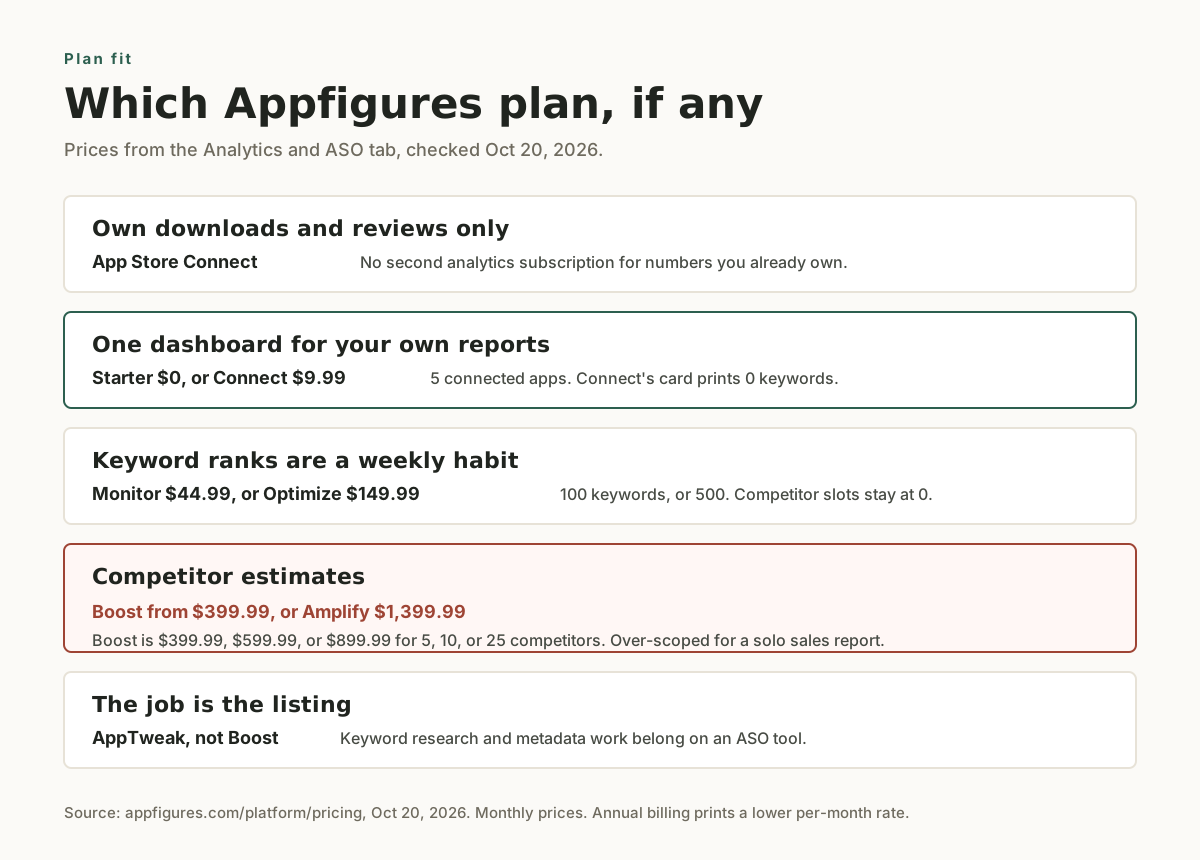
Checked Oct 20, 2026. Connect at $9.99 per month is a small bill for your own reports. The jump that does not fit a solo app is competitor intelligence.
- Boost is $399.99 per month for 5 competitors, $599.99 for 10, and $899.99 for 25, with 1,000 keywords on each. That is a research product.
- Amplify is $1,399.99 per month for 2,500 keywords and unlimited competitors.
- Market Intelligence is a separate tab. Scout is $599.99 per month and the button says Get in Touch. Pathfinder is $1,249.99 per month. Scale is $2,499.99 per month. Explore does not print a price. Leave that tab alone unless market research is the business.
Stay on Starter or Connect when you want the connected-app reports and you are not buying a keyword cap. Move to Monitor or Optimize when you want the printed keyword cap. If the work is choosing keywords and rewriting the listing, go to the ASO category instead of buying Boost.
Setup and integration
You connect App Store Connect and Google Play in the Appfigures dashboard so it can read reports those stores already produce. That is account linking. It is not a purchase SDK inside the app, and it does not see behavior the store reports leave out.
The feature grid has a row named Download and revenue estimates. Treat competitor figures in that row as estimates. Size the keyword list to the plan you actually bought.
Frequently asked questions
What is Appfigures?
Appfigures is a dashboard for store reports on apps you connect. Plan cards on the pricing page add a keyword cap from Monitor upward, and competitor slots from Boost upward. Checked Oct 20, 2026 on the pricing page.
What does Appfigures cost?
Checked Oct 20, 2026. Starter is free. The feature grid prints 5 connected apps and 0 competitors for it, and does not print a keyword allowance. Connect is $9.99 per month, or $7.99 per month on the annual display, with 0 keywords and 0 competitors. Monitor is $44.99 per month for 100 keywords. Optimize is $149.99 per month for 500 keywords. Boost is $399.99, $599.99, or $899.99 per month for 5, 10, or 25 competitors. Amplify is $1,399.99 per month. The sixth connected app, and each app after it, is $1.99.
How is Appfigures different from AppTweak?
Checked Oct 20, 2026. Appfigures is built around reports on apps you connect. The $9.99 Connect card prints 0 keywords. AppTweak is built around keyword research and the listing. Read Appfigures vs AppTweak for that split, and confirm AppTweak's prices on its own page.
Can I get the same numbers without paying Appfigures?
Checked Oct 20, 2026. For your own app, App Store Connect already reports downloads, proceeds, and reviews. Appfigures Starter is free for 5 connected apps in the feature grid. Connect, the first paid plan, still prints 0 keywords. You pay when you want that paid dashboard, a sixth app, or a printed keyword or competitor allowance.
When should a solo developer skip the paid plans?
Skip them when App Store Connect covers the report you actually open. Skip Boost, Amplify, and Market Intelligence when you do not have a research budget. Keyword-first work belongs with the tools in the ASO category, not on the $399.99 Boost plan for 5 competitors (checked Oct 20, 2026).
Alternatives
Related comparisons
Related guides
guide
ASO starter checklist for indie mobile apps
Use this ASO checklist to tighten an app store listing before launch or the next metadata update.
guide
Best ASO Tools for Indie Developers (2026): Prices Compared
A dated price table for Astro, Appfigures, AppTweak, AppFollow, and AppScreens, plus the ASO tool we use on Mantis and MrGripper.
guide
Keywords Everywhere for indie app developers: Google search data, not App Store ASO
Install Keywords Everywhere on a laptop browser, read Google volume while you draft a launch page, and keep App Store listing work in an ASO tool. Pricing, the API key, and the phone answer are on the tool page.