guide
Subscription MVP stack for a solo iOS app
The smallest useful stack for purchases, entitlements, backend, analytics, crashes, and launch basics without building a platform too early.
- Published
- July 10, 2026
- Last checked
- October 22, 2026
- Author
- IndieAppStack
Short answer
For a solo iOS subscription MVP, keep the stack boring: App Store Connect owns the subscription products, RevenueCat owns purchase and entitlement truth, the app owns the paywall and unlock decision, crash reporting catches release regressions, and analytics tracks only the few events you will act on this month.
Add a backend only when paid value depends on account-backed data, synced history, credits, teams, or server-owned records. If the first version can unlock premium features from a verified entitlement, postpone the backend until the product proves it needs one.
Solo iOS subscription apps
Solo builder scope
Stack map
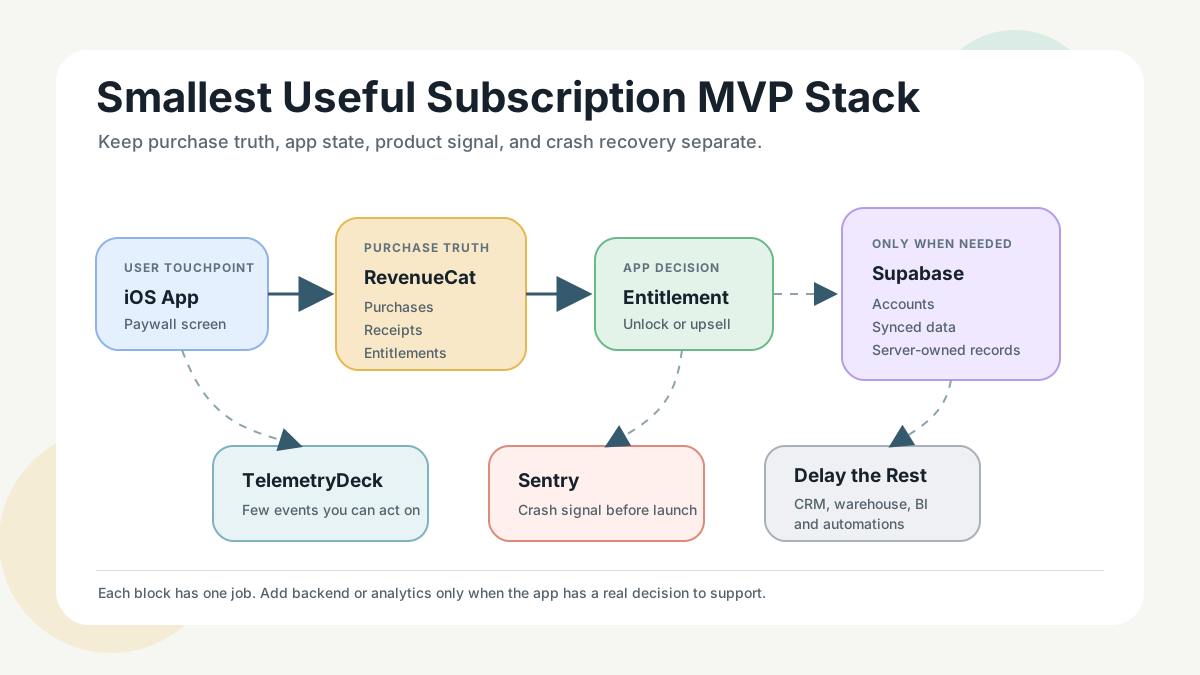
The smallest useful stack
Subscription MVP responsibilities
| Responsibility | Default choice | What it should do |
|---|---|---|
| Subscription products | App Store Connect | Define subscription group, products, prices, trials, review notes, and store metadata |
| Purchase and entitlement truth | RevenueCat | Handle SDK purchase flow, receipt validation, restore purchases, customer state, and entitlement checks |
| Paywall and unlock logic | Your iOS app | Explain the paid promise, show products, call purchase or restore, and unlock only from entitlement state |
| Backend | Supabase only if needed | Store accounts, synced data, server-owned records, credits, or customer portal data |
| Analytics | TelemetryDeck, Firebase Analytics, or a tiny event layer | Track activation, paywall, purchase, restore, and core feature signals |
| Crash reporting | Sentry or Firebase Crashlytics | Catch crashes before and after launch, connect crashes to releases, and triage regressions |
| Launch basics | App Store Connect plus a checklist | Prepare privacy labels, support URL, review notes, TestFlight feedback, and post-launch monitoring |
What each layer owns
Payments
Apple still controls the App Store purchase surface for normal in-app subscriptions. Treat App Store Connect setup as part of product design, not admin work: subscription group, product names, display copy, trial or intro offer decisions, review notes, and restore behavior all affect whether the first purchase path feels trustworthy.
Do not start by building a custom purchase backend. The first job is to make the official in-app purchase path reliable.
Entitlements
Use RevenueCat when the app needs a clean source of truth for active subscriptions, restored purchases, customer IDs, and entitlement checks. The entitlement should answer one boring question: should this user see the paid experience right now?
Keep entitlement names product-agnostic. For example, use a durable entitlement such as Pro access instead of tying app logic to one monthly product. That gives you room to add annual plans, trials, or migrated products later.
Backend
Skip the backend if the paid feature is local and RevenueCat entitlement state is enough. Add Supabase, Firebase, or Appwrite when the subscription unlocks data that must live outside the device.
Backend choice
| Need | Use this direction | Why |
|---|---|---|
| Relational user data, SQL reporting, server-owned records | Supabase | Postgres is easier to inspect and model when data has relationships |
| Google-first mobile stack, Firestore, Crashlytics, Analytics nearby | Firebase | Useful when the app already benefits from the Firebase mobile ecosystem |
| Open-source backend preference or self-hosting path | Appwrite | Useful when ownership and a broader open-source backend surface matter |
| No synced data yet | No backend | The lowest-risk backend is the one you do not operate yet |
Analytics
Start with a tiny event taxonomy. For most MVPs, you need activation, paywall viewed, purchase started, purchase completed, restore attempted, subscription status changed if available, and one or two core paid-feature events.
Use TelemetryDeck when privacy-friendly app analytics is the main job. Use Firebase Analytics when the app already depends on Firebase. Do not install a heavyweight product analytics workflow until there is enough traffic to support weekly decisions.
Crash reporting
Install crash reporting before a public launch, not after the first angry review. Sentry is a strong standalone crash and error monitoring choice. Firebase Crashlytics is a good fit when Firebase is already in the app.
Crash tooling only helps if you triage it. Before launch, decide who checks crashes, what severity blocks release, and how release versions are named.
Launch basics
The stack is not publishable until the purchase path is reviewable and recoverable. Before sending the app to review, check:
- Products and subscription group are configured in App Store Connect.
- Paywall copy explains what the subscription unlocks.
- Restore purchases is visible and tested.
- Privacy labels match analytics and crash SDK behavior.
- Support URL and contact path work.
- TestFlight testers can buy in sandbox or verify the purchase flow.
- Crash reporting is connected to release versions.
- App Store review notes explain where to find the paywall and how to test access.
Setup sequence
Build order
| Order | Step | Acceptance check |
|---|---|---|
| 1 | Define the paid promise | One sentence explains what becomes better after subscribing |
| 2 | Configure App Store Connect | Subscription group, products, display names, prices, and review notes exist |
| 3 | Add RevenueCat | The app can fetch offerings, buy, restore, and read entitlement state |
| 4 | Build the paywall | Paywall copy, product display, purchase state, errors, and restore are handled |
| 5 | Add crash reporting | Test crash or non-fatal signal appears with app version context |
| 6 | Add analytics | A small event list answers activation, paywall, purchase, restore, and paid-feature use |
| 7 | Add backend only if needed | Account-backed or synced data has a real product reason |
| 8 | Prepare launch | Privacy labels, support URL, screenshots, review notes, and post-launch triage are ready |
What to postpone
Postpone anything that needs traffic, operational discipline, or team bandwidth you do not have yet:
- Paywall A/B testing tools before meaningful paywall volume.
- Attribution platforms before paid acquisition.
- Data warehouse exports before recurring reporting pain.
- CRM and lifecycle automation before clear lifecycle messages.
- Custom subscription backend work before purchase reliability is proven.
- Complex account systems before synced data is part of the paid promise.
- BI dashboards before one simple analytics view changes release decisions.
Failure modes to design around
- Purchase succeeds but the app does not unlock. Add clear loading, retry, and entitlement refresh behavior.
- User reinstalls and cannot restore. Make restore purchases visible and test it.
- Backend is down and blocks paid access. Avoid server dependency unless the paid feature truly needs server data.
- Analytics says everything, but nothing changes. Keep events tied to decisions.
- Crash alerts arrive with no release context. Attach versions and triage ownership before launch.
- App Review cannot find or test the subscription. Add review notes and a deterministic path to the paywall.
Best for
- Solo iOS developers launching their first serious subscription app.
- Apps where the paid promise is simple enough to validate before building a large backend.
- Builders deciding between RevenueCat, backend tools, analytics, and crash reporting before TestFlight or launch.
Not good for
- Apps that need complex server-side collaboration, teams, or billing from day one.
- Apps monetized only with ads, one-time web purchases, or enterprise contracts.
- Teams that already have a mature backend, analytics stack, and release process.
Internal links
- Start with the best monetization tools guide for the broader landscape.
- Compare subscription infrastructure in RevenueCat vs Adapty vs Superwall.
- Review the monetization category and paywall tools.
- Compare backend choices in Supabase vs Firebase vs Appwrite for mobile backends and the backend category.
- Add measurement with the privacy-friendly analytics starter stack and the analytics category.
- Install crash monitoring with the crash reporting setup guide and the crash reporting category.
- Use the mobile app launch stack checklist before submitting.
Source checks
Pricing, product, and platform claims were checked on 2026-07-01 against official sources:
- Apple App Store Connect subscription docs: https://developer.apple.com/help/app-store-connect/manage-subscriptions/
- RevenueCat pricing and docs: https://www.revenuecat.com/pricing/ and https://www.revenuecat.com/docs/
- Supabase pricing and docs: https://supabase.com/pricing and https://supabase.com/docs
- Firebase pricing and docs: https://firebase.google.com/pricing and https://firebase.google.com/docs
- Appwrite pricing and docs: https://appwrite.io/pricing and https://appwrite.io/docs
- TelemetryDeck docs and plans: https://telemetrydeck.com/docs/ and https://dashboard.telemetrydeck.com/plans
- Sentry pricing and Apple SDK docs: https://sentry.io/pricing/ and https://docs.sentry.io/platforms/apple/
No hands-on testing claims are made in this article. No screenshots are used. The stack map is an owned conceptual visual created for IndieAppStack.
Last checked: 2026-07-01. Pricing thresholds are summarized at a high level; check official pages before committing.