comparison
RevenueCat vs Adapty vs Superwall for subscription apps
Choose subscription infrastructure, paywall analytics, or remote paywall iteration based on the job your app needs done.
- Published
- July 10, 2026
- Last checked
- October 22, 2026
- Author
- IndieAppStack
Short answer
Choose RevenueCat when purchase infrastructure, receipt validation, entitlements, and subscription data are the core risk. Choose Adapty when the operating problem is paywall workflow plus subscription analytics. Treat Superwall as a third job — remote paywall presentation — and use the dedicated Superwall vs RevenueCat comparison for that matchup.
There is no universal winner. The right first choice depends on which part of the subscription system must be dependable before the next release: the purchase truth, the paywall improvement loop, or the remote presentation layer.
On Aug 18, 2026, RevenueCat is free up to $2,500 in monthly tracked revenue, then 1% of tracked revenue. Adapty is free while monthly revenue stays under $5,000, then 1% of monthly revenue. Both meters are listed in USD before the store cut.

Decision table
RevenueCat vs Adapty vs Superwall
| Decision | RevenueCat | Adapty | Superwall |
|---|---|---|---|
| Choose it when... | Purchase infrastructure and entitlements need to be reliable first | Paywall workflow, subscription analytics, and experiments are one operating loop | Remote paywall presentation and creative iteration are the bottleneck |
| Primary job | In-app purchase infrastructure, entitlement state, customer data, revenue reporting | Subscription infrastructure, paywall and flow builder, experiments, analytics, predictions | Paywall editor, campaigns, audiences, experiments, analytics, integrations |
| Strongest solo-builder fit | First subscription MVP or migration away from custom receipt work | App with enough paywall traffic to learn from tests | App that wants frequent paywall changes without waiting on app releases |
| When not to use it | You already have purchase infrastructure and only want a visual paywall editor | You only need an entitlement check for a tiny MVP | You have not validated why anyone should pay |
| Pricing model to verify | Tracked-revenue meter, free to $2,500 MTR, then 1% | Revenue meter, free under $5,000, then 1%; add-ons priced separately | Infrastructure free at any scale; paywall product metered on attributed revenue |
| Official sources | Pricing and docs | Pricing and docs | Pricing and docs |
The category has converged. All three now cover purchases, entitlements, remote paywalls, and experiments. A feature checklist produces a tie. Choose by the job that must stay boring, then model the meter.
Choose RevenueCat when purchase truth is the job
RevenueCat is the strongest default when the app needs a dependable subscription layer before it needs a sophisticated paywall operating system. That usually means product configuration, SDK integration, receipt validation, restore purchases, entitlement checks, customer state, webhooks, integrations, and revenue reporting.
For a solo iOS app, RevenueCat is especially attractive when you want the purchase path to be boring and trustworthy. The app can focus on the paywall promise and paid experience while RevenueCat owns the subscription state you should not improvise.
RevenueCat also ships remote Paywalls and Experiments that can test two to four offering variants. Those tools sit on top of offerings and entitlements. They do not change the reason to pick RevenueCat first: you want one purchase ledger the rest of the stack can trust.
The Paywalls editor is a visual layer editor: a component tree, a device preview, and offering and layout controls sit around the same screen. The capture below shows an untitled paywall with monthly and yearly packages, a family-plans switch, and a warning when no offering is selected.
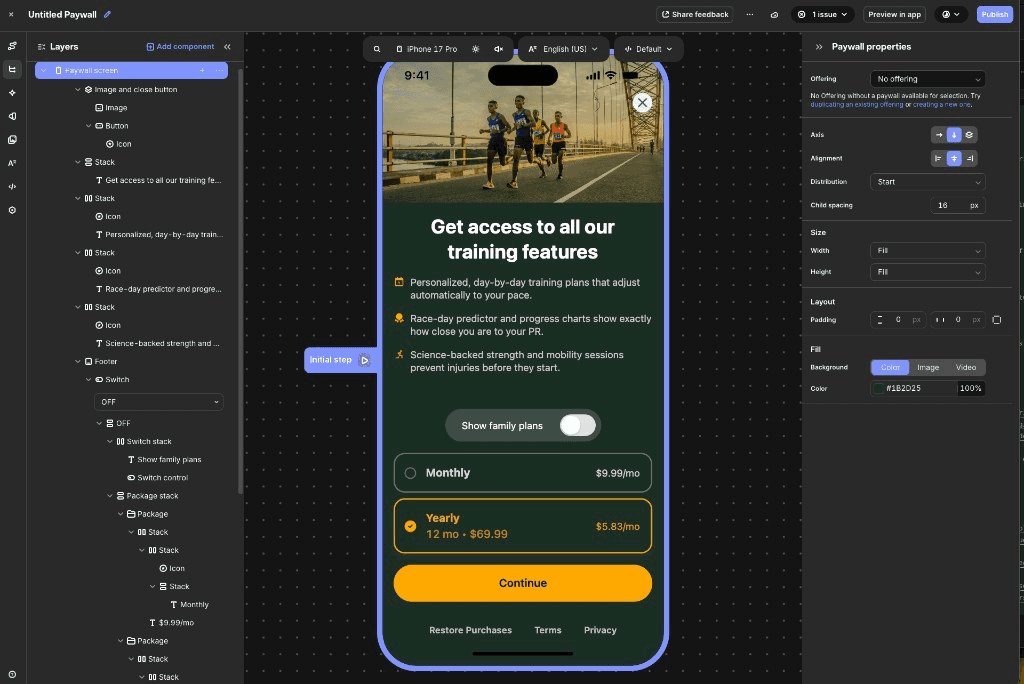
When not to use RevenueCat: skip it when a visual paywall editor is the only missing piece and purchase infrastructure already works. Skip it for a content site that does not need App Store or Google Play in-app purchases. Skip it if you are shopping for a generic backend database, authentication layer, or product-analytics warehouse.
Choose Adapty when paywall analytics are the job
Adapty is a better fit when the question is not just "can users buy?" but "which paywall, offer, onboarding flow, and segment should we show?" Its public materials emphasize subscription infrastructure, revenue analytics, a browser-based paywall and onboarding builder, experiments, segmentation, predictions, and integrations.
Adapty is worth evaluating when your app has enough traffic or launch confidence that paywall iteration is part of the core workflow. New projects are directed to Flow Builder, which combines onboarding screens and a paywall in one editor. The legacy Paywall Builder and Onboarding Builder become read-only on Oct 1, 2026; published screens keep working, but new work should land in Flow Builder on Adapty SDK v4.
The capture below is Adapty's paywall builder in the Builder & Generator tab, not a multi-screen Flow Builder canvas. It shows the same operating idea: an element tree, layout settings, and a live device preview in one workspace.
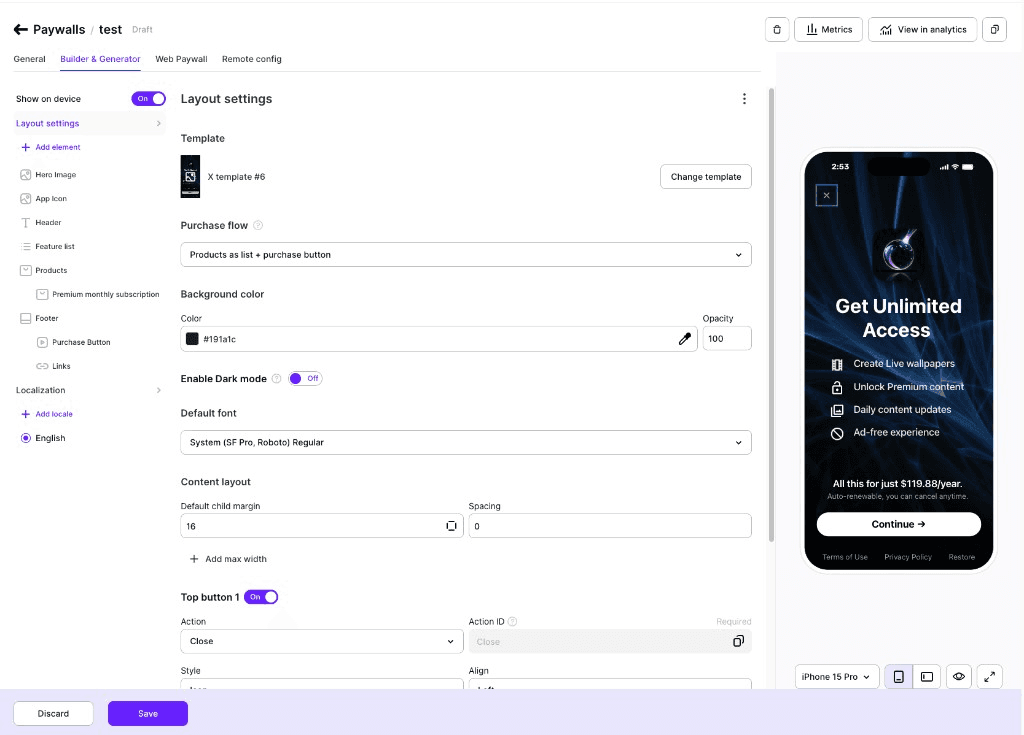
When not to use Adapty: skip it for a tiny MVP where every extra dashboard creates more decisions than value. Skip it if you already have a dedicated analytics and experimentation setup and only want receipt validation. Skip it if you cannot yet define a paid promise, upgrade moment, or success metric for a paywall test.
Where Superwall fits — without splitting this page
Superwall is the remote-paywall job: change paywalls, campaigns, audiences, and upgrade prompts without shipping a new app version each time. Its pricing page keeps subscription infrastructure free at any scale and meters the paywall product on revenue that flows through Superwall-rendered paywalls.
That is a different decision than RevenueCat vs Adapty, so Superwall stays a short third job here rather than a full third product review. For the two-way paywall-versus-infrastructure matchup, read Superwall vs RevenueCat. For Adapty against Superwall, read Adapty vs Superwall. For the wider set, see RevenueCat alternatives.
When not to use Superwall: skip it before the paid promise is clear. Skip it when you still need to choose a purchase-infrastructure source of truth. Skip it if you want one general analytics tool for product behavior beyond paywall and revenue flows.
Decision matrix
Best choice by use case
| Use case | Choose | Why |
|---|---|---|
| Subscription backend first | RevenueCat | Entitlements and purchase infrastructure are the center |
| First paid iOS MVP | RevenueCat | The riskiest early job is usually reliable purchase and restore behavior |
| Paywall analytics plus experiments | Adapty | The tool is shaped around paywalls, subscription metrics, tests, predictions, and segments |
| Frequent remote paywall changes | Superwall | The workflow is centered on paywall presentation, campaigns, audiences, and iteration |
| Growth team optimizing offers | Adapty or Superwall | Choose Adapty if analytics and subscription workflow matter more; choose Superwall if remote presentation and campaigns matter more |
| App with existing RevenueCat setup | Superwall or Adapty | Evaluate whether the missing job is paywall presentation or a broader paywall analytics loop |
| App with no clear paid promise | None yet | Define the paid promise and activation path before adding a paywall tool |
Setup complexity
RevenueCat setup is product mapping, SDK integration, entitlements, identity, restores, and which tools receive purchase events.
Adapty starts in the same subscription territory, then adds flows, analytics, experiments, and segments. If you are still on the legacy builders, move to Flow Builder and SDK v4 before Oct 1, 2026, rather than during a pricing or copy change.
Superwall setup is the remote presentation loop: editor, campaigns, audiences, SDK calls, and integrations. That only pays off if you will run it.
How do RevenueCat and Adapty compare at three revenue levels?
Pricing was source-checked on Aug 18, 2026, from official pages. The percentages look similar. The free boundaries and the revenue base do not.
Estimated monthly platform fee (checked Aug 18, 2026)
| Monthly revenue | RevenueCat | Adapty | Superwall (Indie, all through its paywalls) |
|---|---|---|---|
| $2,500 | $25 | $0 | $0 |
| $10,000 | $100 | $100 | $0 |
| $50,000 | $500 | $500 | $500 |
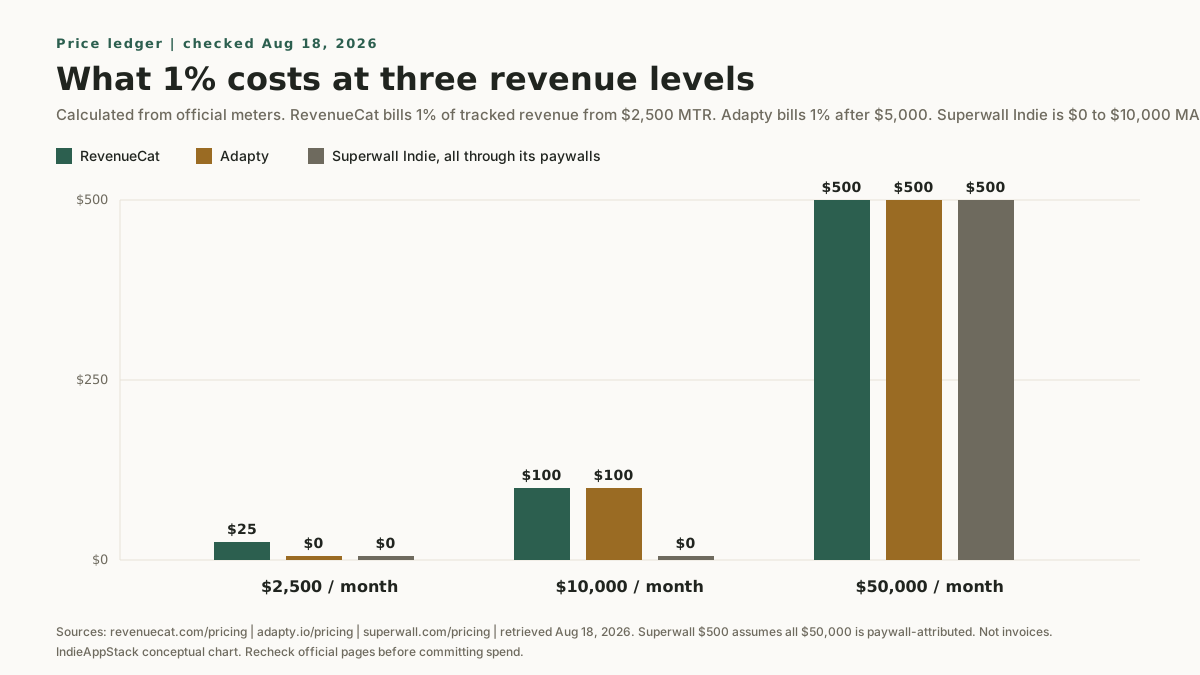
These figures are calculations from the public meters, not invoices:
- RevenueCat is free below $2,500 in monthly tracked revenue (MTR). At $2,500 MTR it charges $25, which is 1% of tracked revenue. Months that stay under the threshold are not billed. MTR is USD, before the Apple or Google cut, and includes paid subscriptions, renewals, and one-time purchases the platform tracks.
- Adapty is free while monthly revenue stays under $5,000. After you cross $5,000 over the last 30 days, you pay 1% of that month's revenue. The same revenue definition applies: USD, before the store cut, including subscriptions, renewals, and one-time purchases. Optional add-ons such as Refund Saver (0.2% of monthly revenue after the free boundary) sit on top of that 1%.
- Superwall keeps entitlements, purchase APIs, webhooks, and SQL access free at any scale. The Indie paywall product is free up to $10,000 in monthly attributed revenue, then 1%. If none of the $50,000 in the table flows through a Superwall-rendered paywall, that Superwall cell becomes $0.
Do not choose from copied plan names alone. Open the official pricing pages and check whether your app's revenue matches how the vendor measures it.
What to verify before switching
- Whether your current purchase identifiers, subscription groups, and entitlement names can map cleanly.
- Whether restore purchase, grace period, refunds, cancellations, and account deletion flows are covered.
- Whether the tool integrates with the analytics, attribution, customer messaging, or backend systems you already use.
- Whether exported data and webhooks are enough for your reporting needs.
- Whether the paywall workflow requires a new app release for the changes you care about.
- For Adapty: whether you are on Flow Builder and SDK v4, or still editing in the legacy builders that become read-only on Oct 1, 2026.
Recommendation
Start with RevenueCat if you need purchase truth before growth tooling. Evaluate Adapty if the next bottleneck is the paywall and subscription analytics loop. Use Superwall vs RevenueCat if the bottleneck is remote presentation.
If you want a lean iOS stack around that choice, start with the Stack Finder.
Common questions
Should I choose RevenueCat or Adapty?
Choose RevenueCat when reliable purchase infrastructure and entitlement truth are the priority, especially for a first subscription MVP or a migration away from custom receipt work. Choose Adapty when paywall analytics, experiments, and subscription metrics are a daily workflow. RevenueCat leads with infrastructure; Adapty leads with the paywall and analytics loop.
How much does RevenueCat cost versus Adapty?
On Aug 18, 2026, both charge 1% after a free boundary. RevenueCat's boundary is $2,500 in monthly tracked revenue ($25 at that point). Adapty's boundary is $5,000 in monthly revenue, so it stays free at $2,500 and matches RevenueCat's 1% once you are at $10,000 and $50,000. Superwall's Indie plan stays $0 at $10,000 if the paywall-attributed revenue stays at or under that cap.
Is Adapty better than RevenueCat for a solo app?
Not universally. Adapty is a better fit once paywall iteration and analytics are part of your routine and there is enough traffic to learn from tests. For a solo app that mainly needs dependable purchases and entitlements, RevenueCat is usually the simpler first choice.
Where does Superwall fit against RevenueCat and Adapty?
Superwall leads with remote paywall presentation and fast iteration, and its infrastructure layer is free at any scale. See the dedicated Superwall vs RevenueCat comparison for that two-way decision, and RevenueCat alternatives for the wider set of options.
Can I switch between these tools later?
Yes, with care. Map your product identifiers, subscription groups, and entitlement names, and confirm restore, refunds, grace periods, and account deletion before switching. Test on a small cohort before moving all traffic.
Source checks
Pricing and product claims were checked on Aug 18, 2026, against official sources:
- RevenueCat pricing, paywalls, and experiments: pricing, docs, Paywalls, Experiments
- Adapty pricing, paywalls, and builder deprecation: pricing, docs, paywall setup, Paywall Builder deprecation
- Superwall pricing and docs: pricing, docs
Pricing meters and free thresholds change often, so confirm the current numbers on each official pricing page before committing. No hands-on testing claims are made in this article. The comparison graphics are owned conceptual visuals created for IndieAppStack. The product screenshots are owned captures of the RevenueCat Paywalls editor and the Adapty paywall builder (Builder & Generator).
Last checked: Aug 18, 2026.
Related tools and guides
- Compare RevenueCat, Adapty, and Superwall.
- Go deeper on one matchup in Superwall vs RevenueCat.
- Compare the pair in Adapty vs Superwall.
- See the wider set in RevenueCat alternatives.
- Review the paywalls category and monetization category.
- Read Best paywall tools for iOS apps.
- Start earlier with the subscription MVP stack guide.
- Use the monetization tools hub if you are still deciding the broader stack.