guide
Paywall apps for iOS
Choose by the job and the meter: infrastructure, remote paywalls, analytics, or a screen you build yourself.
- Published
- July 10, 2026
- Last checked
- October 22, 2026
- Author
- IndieAppStack
Short answer
Paywall apps for iOS now cover two jobs at once: purchase and entitlement infrastructure, and the screen that sells the subscription. Choose the tool whose meter matches the revenue you will actually track. If you cannot name a paywall experiment, a custom paywall solution in your own StoreKit screen is still a valid start.
On Oct 15, 2026, the public meters were:
- RevenueCat is free while monthly tracked revenue stays under $2,500, then 1% of that whole amount.
- Adapty is free while tracked revenue stays under $5,000, then 1% of that month.
- Superwall keeps purchase infrastructure free at any scale. The Indie paywall plan is $0 up to $10,000 in paywall-attributed revenue, then 1% of that revenue.
- Qonversion is free while monthly tracked revenue is at or under $7,000, then 0.8% of the whole amount.
Solo builder scope

Dated prices across the four meters
The percentages look similar. The free boundary, and what counts as revenue, do not. RevenueCat, Adapty, and Qonversion meter revenue the platform tracks, including renewals and one-time purchases, in USD, before Apple or Google take a cut. Superwall's paywall product meters only revenue that flows through a Superwall-rendered paywall. Subscriptions bought on a screen Superwall did not render are not on that bill.
Monthly platform fee, checked Oct 15, 2026
| Monthly revenue on the vendor's meter | RevenueCat | Adapty | Superwall Indie | Qonversion |
|---|---|---|---|---|
| $8,000 | $80 | $80 | $0 | $64 |
| $10,000 | $100 | $100 | $0 | $80 |
| $50,000 | $500 | $500 | $500 if all of it is paywall-attributed; $0 if none is | $400 |
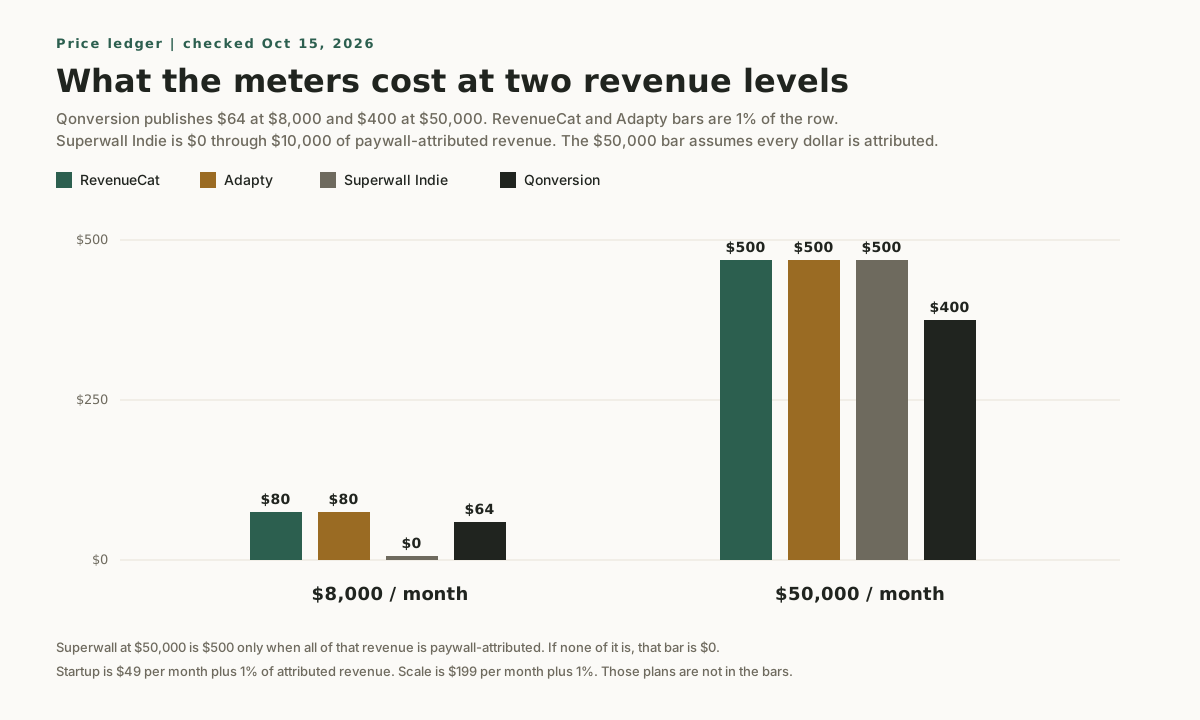
Qonversion publishes the $8,000 and $50,000 rows itself: $64 and $400. Its $10,000 cell is the same 0.8% rate, calculated rather than copied from an example. The RevenueCat and Adapty cells are 1% of the row. Superwall Indie is $0 at $8,000 and $10,000 because those amounts sit inside the free band, and $500 at $50,000 only when every dollar is paywall-attributed. Those calculated cells are not sample invoices.
Two boundaries are easy to misread:
- RevenueCat bills 1% of the whole monthly tracked revenue once you are above $2,500, not 1% of the dollars above that line. Its billing docs use $2,600 as a $26 charge. A later month under $2,500 returns to $0.
- Adapty's free check is a rolling 30 days under $5,000. Once you cross $5,000, the pricing FAQ says you pay 1% of that amount and, from then on, 1% of each month's revenue. It does not say a later quiet month returns to $0.
Superwall Indie is the $0 plan in the table. Startup is $49 per month plus 1% of paywall-attributed revenue. Scale is $199 per month plus 1%. Subscription infrastructure stays $0 on every plan. RevenueCat also offers Growth tools if you keep your own purchase backend and only want paywalls, funnels, or experiments: the pricing page says you pay 1% of monthly tracked revenue on what those tools track.
Which job is the bottleneck
Because the four products overlap, a feature checklist ends in a tie. The useful question is which job has to stay boring, and which meter matches the revenue you will put through it.
Paywall stack fit
| Decision | RevenueCat | Superwall | Adapty | Qonversion |
|---|---|---|---|---|
| Center of gravity | Purchase and entitlement infrastructure | Remote paywall presentation | Paywall building plus subscription analytics | One subscription bundle at 0.8% |
| Choose it when | The purchase ledger is the risk | You will change paywalls without an app release | Paywall tests and revenue analytics are one workflow | You want the published 0.8% meter and every feature on one plan |
| When not to use it | You already have purchase infrastructure and only need a visual editor | You cannot yet say why anyone should pay | A tiny MVP where another dashboard is more work than the test | You need the bill to ignore revenue the paywall did not convert |
| Pricing meter | 1% of tracked revenue above $2,500 | Indie: 1% of paywall-attributed revenue above $10,000 | 1% of monthly revenue after $5,000 | 0.8% of tracked revenue after $7,000 |
RevenueCat, when the purchase ledger is the job
RevenueCat is the default when the app needs receipt validation, restore, entitlement state, and cross-platform customer data before it needs a sophisticated paywall desk. Remote paywalls and experiments sit on that ledger. They are not the reason to start here.
The Paywalls editor is a visual layer editor: a component tree, a device preview, and offering controls on one screen. The capture below is an owned screenshot of that editor from an earlier IndieAppStack page. It shows the workspace. It is not a test of conversion, and it is not a pricing source.
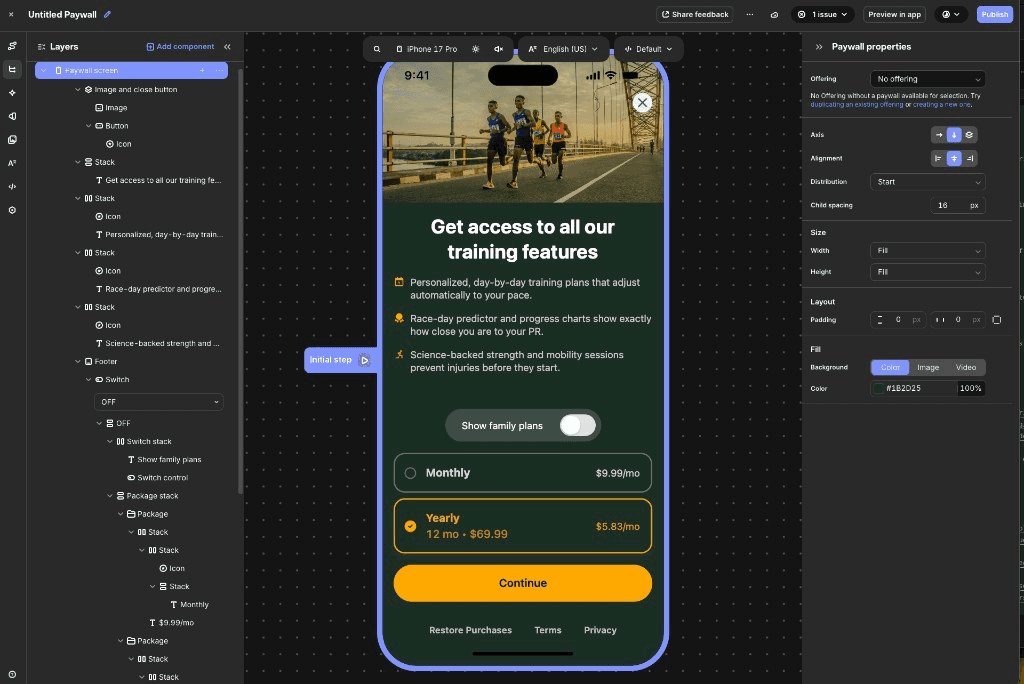
When not to use RevenueCat: leave it off the list when purchase infrastructure already works and the only gap is a visual paywall editor. A content site with no App Store or Google Play purchases does not need it. If the next bill should ignore revenue that did not pass through a paywall you are iterating, read the Superwall meter before you import the whole book of business onto a tracked-revenue percentage.
Superwall, when the paywall changes more often than the app
Superwall bills the paywall product on revenue its own paywalls generate, and leaves entitlements, purchase APIs, webhooks, and SQL access at $0 at any scale. That is the fit when remote layout, copy, targeting, and tests are the bottleneck, and when a large share of existing subscribers should stay off the percentage.
When not to use Superwall: wait if the paid promise is still unclear. It is also the wrong addition when you still need to choose a purchase source of truth and you will not use the free infrastructure layer on purpose. If the paywall will not change between releases, the remote editor has nothing to do. Startup and Scale add a flat monthly fee beside the 1% paywall meter, so model Indie first and step up only when you need the extra features on those plans.
Adapty, when paywall tests and analytics are one loop
Adapty fits when the operating question is which paywall, offer, and segment to show, and you want subscription analytics beside that work. The pricing page describes a browser paywall and onboarding builder, experiments, and revenue analytics such as MRR, churn, and LTV.
The capture below is Adapty's paywall builder, an owned screenshot from an earlier page. It shows an element tree and a device preview. It is not evidence that a test changed revenue.
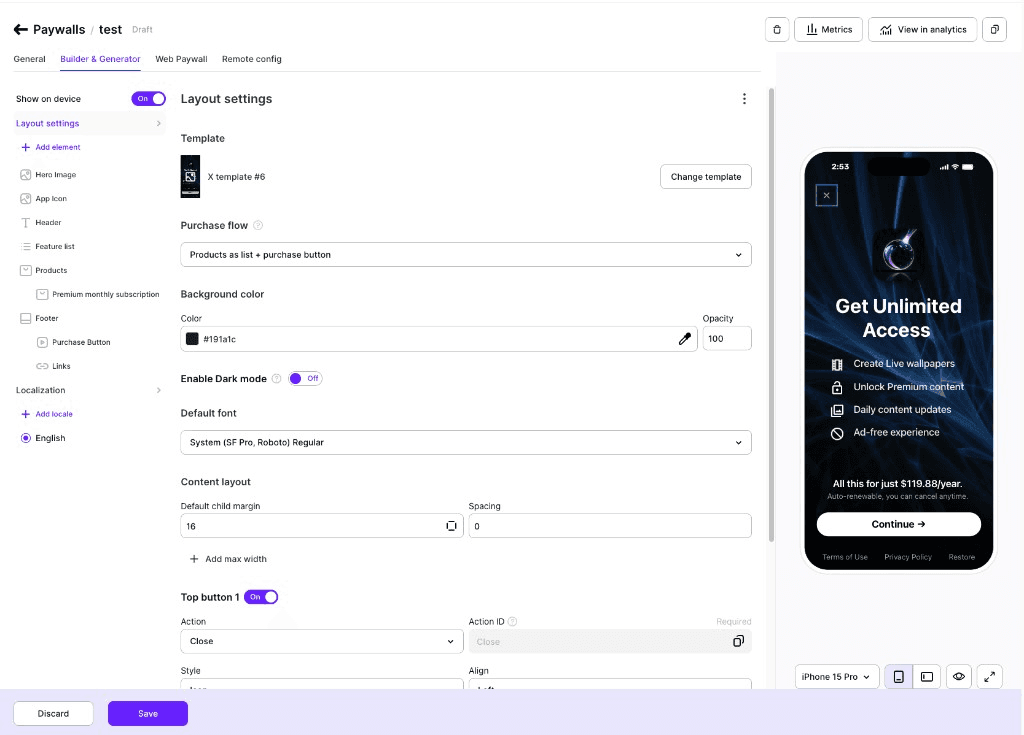
When not to use Adapty: a tiny MVP, where the extra dashboard creates more decisions than the app has traffic to answer, should stay on a simpler screen. If you already have purchase infrastructure and only want a paywall bill on attributed revenue, this meter is the wrong shape. If you need a later month under $5,000 to return to $0 by itself, the pricing FAQ does not promise that.
Qonversion, when the 0.8% bundle is the point
Qonversion publishes one Pro plan. Analytics, A/B experiments, the no-code paywall builder, Refund Keeper, integrations, and raw data export are on that plan, not on a higher feature tier. Enterprise adds services: a custom contract, an uptime SLA, a customer success manager, and an onboarding engineer.
The pricing page's own examples are the cleanest check. At $8,000 in monthly tracked revenue the bill is $64. At $50,000 it is $400. Both are 0.8% of the whole amount, not 0.8% of the dollars above $7,000.
When not to use Qonversion: the meter is revenue processed through its SDK, so it is the wrong bill when the percentage should apply only to paywall-attributed revenue. If you will not use the bundled analytics and experiments, the bundle is the wrong purchase. A custom paywall solution is the cheaper operating choice when the screen will not change.
A custom paywall solution
A custom paywall solution is the screen you design in the app and present with StoreKit. You do not pay RevenueCat, Adapty, Superwall, or Qonversion a percentage for that screen. You also do not get a remote editor, a hosted experiment, or a vendor entitlement ledger. Layout, copy, and price display ship with the app.
That is the right start for one product, one screen, and no experiment you can name. It is the wrong start when you already know you will change the paywall more often than you submit a build, or when Android and web need the same entitlement state. A custom screen is still an App Store purchase. It is not a Stripe checkout. Read why Stripe is not a RevenueCat alternative on iOS before treating a web payment form as a substitute for this choice.
When you do not need a paywall platform yet
A remote experiment earns its SDK when there is enough paywall traffic to move a metric you trust. Before that:
- Ship one clear screen and make purchase and restore reliable.
- Keep price and copy changes on the release you were going to ship anyway.
- Instrument the funnel with a few events. The privacy-friendly analytics starter stack is the lean version.
- Add a paywall platform when you can name the test, not when a directory lists one.
Where to go next
If you want a lean iOS stack around the tool you pick, start with the Stack Finder.
- Read the head-to-head RevenueCat vs Adapty vs Superwall comparison, and Superwall vs RevenueCat when the question is paywall iteration versus purchase infrastructure.
- Fit the choice into the subscription MVP stack guide.
- Start broader with monetization tools for solo mobile developers.
- Browse the paywalls category and the monetization category.
Source checks
Pricing pages were opened on Oct 15, 2026:
- RevenueCat pricing: https://www.revenuecat.com/pricing
- RevenueCat billing docs, including the $2,600 example and the return to $0 under $2,500: https://www.revenuecat.com/docs/welcome/set-up-revenuecat/account-management
- Adapty pricing, including the rolling $5,000 check and the "from then on" billing line: https://adapty.io/pricing/
- Superwall pricing, including Indie, Startup at $49, Scale at $199, and free infrastructure: https://superwall.com/pricing
- Qonversion pricing, including the $64 and $400 examples: https://qonversion.io/pricing
No hands-on testing claims are made in this guide. The decision graphic and the fee chart are owned diagrams. The two editor images are owned captures of vendor dashboards, used to show the workspace, not to prove a result.
Last checked: Oct 15, 2026.
Common questions
What are paywall apps for iOS?
Paywall apps for iOS are the tools that sell a subscription and keep entitlement state. RevenueCat, Adapty, Superwall, and Qonversion each cover purchases and a remote paywall. The practical difference is the meter and the job you will actually run: a purchase ledger, paywall analytics, remote iteration, or a lower published percentage.
What does a custom paywall solution cost?
A custom paywall solution has no vendor percentage in the tables above. You pay the App Store commission on the purchase, and you pay in engineering time when the screen, the copy, or the price display has to change. Add a platform when that release cost is the bottleneck.
When should a solo app skip these tools?
Skip all four when the app has one product, one screen, and no experiment you can name. Skip RevenueCat when you only need a visual editor. Skip Superwall when you will not change the paywall between releases. Skip Adapty when you need a quiet month under $5,000 to bill $0 again by itself. Skip Qonversion when the bill should ignore revenue that never touched the paywall.
Do these prices include Apple's commission?
No. RevenueCat's billing docs measure monthly tracked revenue before store commission and taxes. Adapty's pricing FAQ uses the same idea: USD, before Apple, Google, or Stripe take a cut. Qonversion's monthly tracked revenue is revenue processed through its SDK. Superwall's paywall percentage applies only to paywall-attributed revenue. Model the store fee separately.