comparison
RevenueCat vs Superwall for iOS subscription apps
The same decision as Superwall vs RevenueCat: purchase truth, remote paywalls, or both.
- Published
- July 19, 2026
- Last checked
- October 22, 2026
- Author
- IndieAppStack
Short answer
RevenueCat vs Superwall is a choice about which job is the bottleneck. Choose RevenueCat when purchase truth has to be dependable before the next release. Choose Superwall when the bottleneck is changing paywalls without an App Store review. Superwall vs RevenueCat is that same decision with the names reversed. The jobs stay put when the word order changes.
Run one tool when only one of those jobs is active. Run both when purchase truth and paywall iteration are each real work this month. Prices below were checked Sep 27, 2026.
Solo builder scope

RevenueCat vs Superwall at a glance
RevenueCat vs Superwall (checked Sep 27, 2026)
| Decision | RevenueCat | Superwall |
|---|---|---|
| Center of gravity | Purchase infrastructure, entitlements, and customer state | Remote paywall presentation, with free infrastructure underneath |
| Choose it when | Purchase truth must be reliable before anything else | You will change paywalls often without waiting on app review |
| Paywall iteration | Included, including a path that uses only the growth tools | The paid product: edit and test paywalls remotely |
| Entitlement source of truth | Yes, on its own, or when a purchase controller keeps RevenueCat in charge | Yes, on its own free infrastructure layer. In the recommended paired setup, Superwall completes the purchase and is the entitlement authority |
| Pricing meter | Free while monthly tracked revenue (MTR) stays under $2,500, then 1% of the whole MTR | Infrastructure free at any scale. Indie paywalls are $0 up to $10,000 monthly attributed revenue (MAR), then 1% of total MAR |
| What the 1% covers | Purchases and renewals RevenueCat tracks, before store commission and taxes | Revenue that flowed through a Superwall-rendered paywall, not every subscription the app tracks |
| Official sources | Pricing and billing docs | Pricing |
Superwall vs RevenueCat is the same choice
People search both orders. RevenueCat vs Superwall and Superwall vs RevenueCat name the same two products. Reversing the words does not reverse the jobs.
RevenueCat leads with purchase infrastructure. It handles StoreKit, receipt validation, restore, entitlement checks, webhooks, and cross-platform customer data, then adds paywalls and growth tools on top. Superwall leads with the paywall: a remote editor, campaigns, audiences, and experiments. Under that, subscription infrastructure — entitlements, purchase APIs, webhooks, and SQL access — is free at any scale.
Each product can present a paywall, and each can own entitlements. Choose by the job that is the bottleneck this month.
What each meter charges
The headline rate on both public pricing pages is 1%. The revenue base is different. Compare the base before you compare the rate.
RevenueCat bills monthly tracked revenue. MTR is the amount charged to the customer, before store commission and taxes, including purchases and renewals and non-subscription products. MTR under $2,500 is free. MTR above $2,500 is billed at 1% of the whole tracked amount, not only the dollars above the line. RevenueCat's own example: $2,600 in MTR bills $26. A later month that falls back under $2,500 returns to $0. Checked Sep 27, 2026 on the pricing page and the billing docs.
Superwall bills two layers, and they do not share a meter. Infrastructure is $0 at any scale. The paywall product on Indie is $0 up to $10,000 in monthly attributed revenue, then 1% of total MAR. MAR here is paywall-attributed revenue: subscriptions purchased outside a Superwall paywall, and imported or pre-integration users, are not on that meter. Superwall's own illustration on the pricing page: a $50,000 month with nothing through a Superwall paywall is $0; the same month with half through a Superwall paywall is 1% of $25,000, and the other $25,000 stays unmetered. Checked Sep 27, 2026 on superwall.com/pricing.
Two plan details sit beside that Indie figure.
- RevenueCat also sells growth tools at 1% of MTR on the conversions those tools produce, if you keep your own purchase backend. The table below uses the Pro meter, which is the one that tracks the app's purchases.
- Superwall Startup is $49 per month plus 1% of MAR, and Scale is $199 per month plus 1% of MAR. Those cards do not reprint the $10,000 free band. Localization and collaborators sit on Startup, so a solo builder who needs them pays $49 per month even while attributed revenue is still small. The full tier table is on the Superwall tool page.
Estimated monthly fee (checked Sep 27, 2026)
| Assumption | RevenueCat Pro | Superwall Indie |
|---|---|---|
| $2,500, and RevenueCat tracks all of it | $0 (at the free boundary: pay nothing for up to $2,500) | $0 |
| $2,600 MTR | $26 (RevenueCat's published example) | $0 if that amount is the paywall-attributed total, because it is under $10,000 MAR |
| $10,000, all of it tracked and all of it through a Superwall paywall | $100 (1% of the whole MTR) | $0 (Indie is free up to $10,000 MAR) |
| $50,000, all of it tracked and all of it through a Superwall paywall | $500 | $500 (1% of total MAR) |
| $50,000 tracked by RevenueCat, with $25,000 through a Superwall paywall | $500 | $250 (calculated from Superwall's published example, which states 1% of $25,000) |
| $50,000 tracked by RevenueCat, with none of it through a Superwall paywall | $500 | $0 (Superwall's published example) |
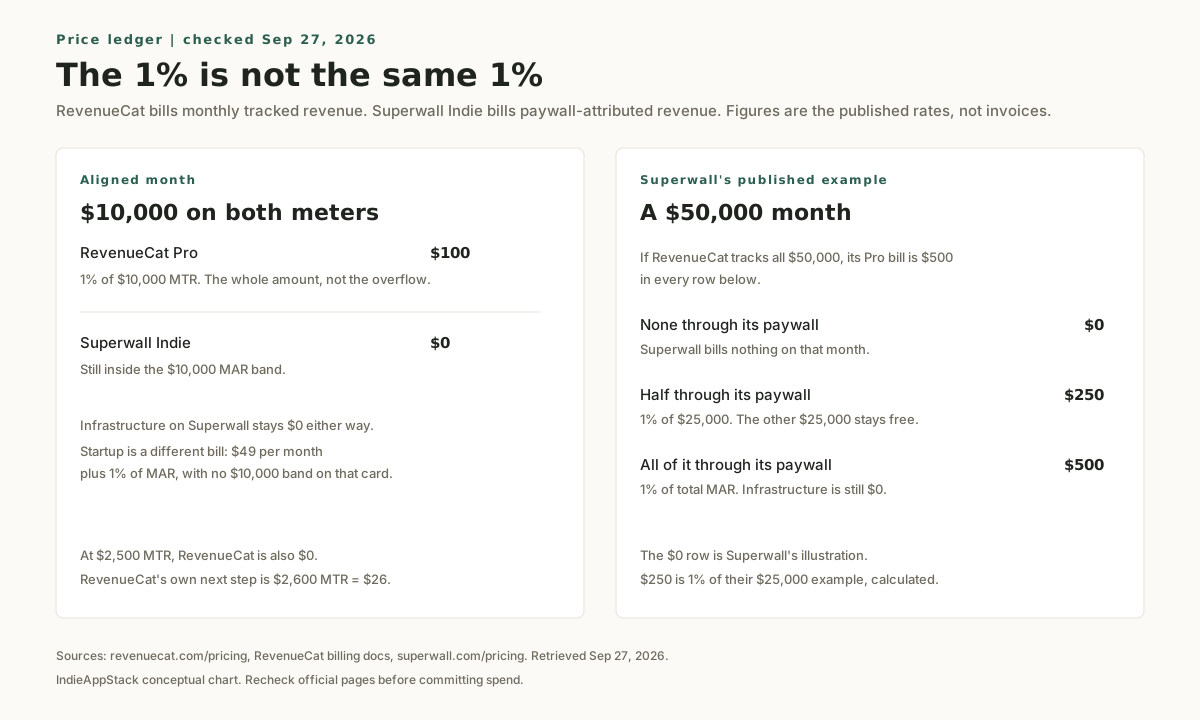
Those dollar figures are arithmetic from the published rates, plus the examples each vendor prints. They are not invoices. Confirm the live numbers before you commit spend.
When to run both rather than choose
You can run both. Both vendors document a path, and the paths are not the same job.
Superwall's iOS guide, Using RevenueCat, describes two setups (checked Sep 27, 2026):
- Purchase controller. Superwall presents the paywall. RevenueCat performs the purchase and the restore, and you sync Superwall's subscription status from RevenueCat entitlements. This is the setup where RevenueCat stays the entitlement source of truth.
- Observer mode, which Superwall recommends for the paired setup. You tell RevenueCat that your app completes purchases. Superwall completes the purchase. RevenueCat observes the transactions for its charts. In this mode you are not using RevenueCat entitlements as the source of truth. User identifiers still have to match across the two SDKs.
A third, separate switch lives in the RevenueCat dashboard: forwarding billing events to Superwall for revenue tracking. That integration does not present the paywall and it does not replace either SDK. The steps are on RevenueCat's Superwall integration page.
The cost of running both is two systems to configure, identify users in, and reason about. Do it when paywall iteration and purchase reporting are each active work. If only one job matters this month, start with the single tool that owns it.
Superwall can also own entitlements alone, because the infrastructure layer is free at any scale. Confirm that layer covers the platforms and the reporting you need before you drop a second SDK. If you want a lean iOS stack around that choice, start with the Stack Finder.
When not to use RevenueCat
Skip RevenueCat when any of these is the actual situation:
- You only need a remote paywall editor, and purchase infrastructure is already reliable.
- The product is web-only and does not use App Store or Google Play in-app purchases.
- You want a generic backend, a database, or a product-analytics warehouse. RevenueCat does not replace those.
- The app is iOS-only, has one product, and you will not change the paywall without a release. StoreKit 2 can own that case.
RevenueCat is the wrong first tool when the thing you will do every week is rewrite the paywall, and the purchase path is already boring.
When not to use Superwall
Skip Superwall when any of these is the actual situation:
- Nobody has a reason to pay yet. A remote editor does not invent the offer.
- Purchase infrastructure and cross-platform customer state are the risk you need to retire before you touch presentation.
- You want paywall experiments and subscription analytics as one paid bundle. That is a closer description of Adapty than of Superwall. The three-way page is RevenueCat vs Adapty.
- You need auth, a database, or file storage. Superwall is not a backend.
If Superwall is not the fit, the wider shortlist is Superwall alternatives for indie iOS apps: RevenueCat, Adapty, Qonversion, StoreKit 2, or keeping RevenueCat and adding Superwall only for experiments.
When to use neither
A native StoreKit 2 paywall with no third-party SDK is a valid launch for a simple app. Add RevenueCat, Superwall, or both when you can name the reliability problem or the paywall experiment the tool is there to solve.
Common questions
What does RevenueCat vs Superwall come down to?
The job you need done this month. RevenueCat vs Superwall favors RevenueCat when receipt validation, entitlements, and cross-platform customer state have to be dependable first. It favors Superwall when you will change paywall layout, copy, targeting, and tests without an App Store release. Both can do parts of the other job. Lead with the bottleneck.
What does Superwall vs RevenueCat come down to?
The same choice, with the names reversed. Superwall vs RevenueCat asks which job you need: remote paywall iteration, or purchase infrastructure. Then compare the meter. Once monthly tracked revenue is above $2,500, RevenueCat's 1% applies to the whole MTR, not only the amount past the line. Superwall's paywall 1% applies only to paywall-attributed revenue, and Indie stays at $0 through $10,000 MAR. Checked Sep 27, 2026.
Which costs less at $10,000 a month?
On the published Indie and Pro meters, Superwall Indie is $0 at $10,000 of paywall-attributed revenue, and RevenueCat Pro is $100 if it tracks $10,000 of MTR. That comparison holds only when the $10,000 is on both meters. If half of a larger month never touches a Superwall paywall, Superwall's bill is 1% of the attributed half, while RevenueCat's bill is still 1% of everything it tracks. Startup at $49 per month plus 1% of MAR is a different Superwall bill, and it is the one you pay if you need localization or collaborators.
Can RevenueCat and Superwall run together?
Yes. Superwall documents a purchase controller, where RevenueCat completes purchases, and an observer mode, where Superwall completes purchases and RevenueCat records them. Observer mode is the paired setup Superwall recommends, and in that mode RevenueCat entitlements are not the source of truth. RevenueCat also documents a dashboard integration that forwards subscription events to Superwall. Either way you operate two SDKs, and the app user id has to match. Checked Sep 27, 2026.
Do you need either tool to ship a paywall?
No. StoreKit 2 can sell a subscription with the paywall in the app. Add a tool when remote iteration or purchase-state maintenance is the problem you can name. The subscription MVP stack guide is the earlier cut of that choice.
Source checks
Pricing and the paired-setup claims were checked on Sep 27, 2026 against official sources:
- RevenueCat pricing: https://www.revenuecat.com/pricing/
- RevenueCat billing and the $2,600 example: https://www.revenuecat.com/docs/welcome/set-up-revenuecat/account-management
- Superwall pricing, plan cards, and the $50,000 attributed-revenue examples: https://superwall.com/pricing
- Superwall with RevenueCat on iOS: https://superwall.com/docs/ios/guides/using-revenuecat
- RevenueCat event forwarding to Superwall: https://www.revenuecat.com/docs/integrations/third-party-integrations/superwall
No hands-on testing claims are made in this comparison. The two graphics are owned conceptual visuals. The fee chart states its assumptions in the caption and the footer.
Last checked: Sep 27, 2026.
Related tools and guides
- Read Superwall pricing for the Indie, Startup, Scale, and Enterprise cards.
- Read RevenueCat pricing for the MTR threshold and the growth-tools path.
- Compare the wider shortlist in Superwall alternatives for indie iOS apps.
- See the three-way matchup in RevenueCat vs Adapty.
- Start from the subscription MVP stack guide.
- Review paywall tools for iOS apps and the paywalls category.
- If you are still choosing the broader stack, use the Stack Finder.